
A junior developer on my team recently asked for the best way to send sensitive API keys to a remote contractor. My immediate response was, "Definitely not over Slack or email." This simple question highlights a massive blind spot for many: the default tools we use daily are often fundamentally insecure for transferring confidential information.
In tech forums and developer communities, this topic comes up constantly. We've all seen the horror stories of credentials being leaked or private documents ending up in the wrong hands. The consensus is clear: we need methods that prioritize privacy and security from the ground up. Let's explore the options that get the nod from people who build and secure software for a living.
Table of Contents
The Problem with Standard Tools
Before diving into solutions, it's crucial to understand why your go-to methods are risky. Standard email services, for instance, are like sending a postcard. The message travels across various servers in plain text, and anyone with access to those servers can potentially read it. While transport layer security (TLS) helps, it doesn't protect the data once it's at rest on a server.
Popular cloud storage providers like Google Drive or Dropbox offer convenience, but their default security models are not zero-knowledge. This means the company can, in theory, access your files. For everyday collaboration, that's fine. For trade secrets, legal documents, or authentication keys, it's an unacceptable risk according to most forum expert opinions.
The Illusion of Private Channels
Many people assume that a direct message on a platform like Slack or Microsoft Teams is private. While these channels are protected from the public, they are not typically end-to-end encrypted. The platform administrator or the company itself can often access these communications. Relying on them for sensitive data is a common mistake that can have serious consequences.
Community-Recommended Sharing Methods
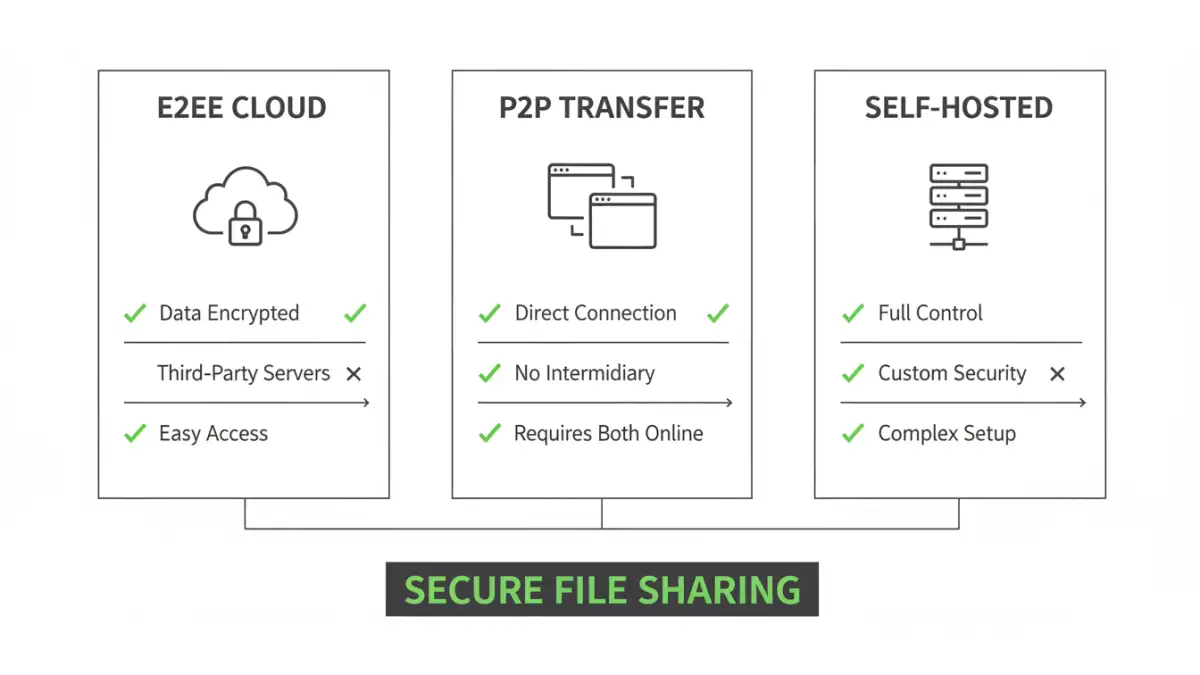
In technical communities, the recommendations consistently point toward solutions built on a foundation of zero-knowledge and end-to-end encryption (E2EE). This means only the sender and the intended recipient can decrypt and view the files.
End-to-End Encrypted Cloud Services
These services look and feel like traditional cloud storage but with a critical difference: encryption and decryption happen on your device. The service provider only stores unintelligible encrypted data and has no way to access your files. Popular and frequently recommended options include:
- Tresorit: Often cited for its Swiss privacy laws and strong focus on business use cases. It's a paid service but is considered a gold standard.
- Sync.com: A Canadian-based provider known for its robust E2EE and generous free tier, making it accessible for personal use or small teams.
- Proton Drive: From the creators of Proton Mail, this service is part of a larger ecosystem of privacy-focused tools and is gaining significant traction.
The best way to share documents securely for ongoing collaboration is often through one of these platforms. You create a secure, shared folder and grant access, knowing the provider can't peek at the contents.
Browser-Based P2P Encrypted File Transfer
For one-off transfers, peer-to-peer (P2P) services are a fantastic option. These tools create a direct, encrypted connection between your browser and the recipient's. The file never gets stored on a central server. Wormhole.app and the community-revived Firefox Send are top contenders. You upload a file, get a unique link, and once the recipient downloads it, the link often expires and the data is gone forever.
The DIY Approach: Self-Hosting for Ultimate Control
For those who want zero reliance on third parties, self-hosting is the ultimate answer. By setting up your own file-sharing server, you control the hardware, the software, and the data. This is the path for the truly security-conscious and technically proficient.
Tools like Nextcloud or FileRun allow you to create your own private cloud. You can install it on a server in your office or on a virtual private server (VPS) from a provider like Linode or DigitalOcean. This gives you complete sovereignty over your data, which is a powerful guarantee of privacy.
Key Considerations for Self-Hosting
While self-hosting provides maximum control, it also comes with maximum responsibility. You are in charge of server setup, maintenance, applying security patches, and performing backups. A misconfigured server can be far less secure than a reputable E2EE cloud service. This option is powerful but not for the faint of heart.
Universal Best Practices for Any Method
Regardless of the tool you choose, certain practices are non-negotiable for secure file sharing. These are the ground rules repeated in every security forum.
- Archive & Encrypt Locally: Before uploading anything, compress sensitive files into an encrypted archive (like a .zip or .7z) with a strong password. This adds another layer of protection.
- Out-of-Band Password Sharing: Never send the password using the same method you used to send the file. If you email the encrypted file, send the password via a secure messaging app like Signal or even a simple text message.
- Use Ephemeral Links: Always set expiration dates and download limits on shared links. If a link leaks, its useful lifespan will be short.
- Verify Recipient Identity: Before sending highly sensitive information, confirm the recipient's identity through a separate, trusted channel. A quick phone call can prevent a costly mistake.
Adhering to these principles transforms a good tool into a great security process, ensuring your data remains confidential from sender to recipient.
Comparison of Secure Sharing Approaches
| Approach | Security Level | Ease of Use | Best For |
|---|---|---|---|
| E2EE Cloud Services (e.g., Tresorit) | Very High | Easy | Ongoing collaboration, business use |
| P2P Browser Transfer (e.g., Wormhole) | High | Very Easy | Quick, one-time sharing of sensitive files |
| Self-Hosted (e.g., Nextcloud) | Highest (if configured correctly) | Difficult | Total data sovereignty, technical users |
| Standard Cloud (e.g., Google Drive) | Moderate | Very Easy | Non-sensitive collaboration |
| Email Attachment | Low | Very Easy | Public or non-confidential information only |