
It was 8 PM on a Tuesday when my phone buzzed with a frantic call from a lawyer friend. He was hours away from a critical court filing deadline and had hit a wall: a key evidentiary document, a multi-page PDF, was locked behind a password he couldn't remember. The assistant who set the password was unreachable, and panic was setting in. This wasn't just an inconvenience; it was a situation that could jeopardize his case.
This kind of scenario is more common than you'd think, highlighting the double-edged sword of digital security. Strong passwords protect sensitive information, but they can also lock out the people who need access most. His problem became my challenge for the evening.
Table of Contents
The High-Stakes Problem: A Locked Legal Brief
The first step in any technical troubleshooting is to understand the exact nature of the problem. Was the file corrupted? Was it an issue with his PDF reader? Or was it purely a forgotten password? A few quick questions confirmed it was the latter. He could see the file, but any attempt to open, print, or edit it was met with a password prompt.
This immediately brought up an important distinction in PDF security, one that was crucial to how we would proceed. Not all PDF passwords are created equal.
Understanding Owner vs. User Passwords
A 'User Password' (or 'Open Password') is the first line of defense. It encrypts the entire document, and you cannot even view its contents without entering it. If this is forgotten, recovery is extremely difficult and often requires specialized software to run brute-force attacks, which can take hours, days, or even longer.
An 'Owner Password' (or 'Permissions Password'), on the other hand, allows you to open and view the document but restricts actions like printing, copying text, or editing. My friend could open the file to view it, which was our first big clue. This meant we were dealing with an Owner Password, which gave us a significant advantage and a few clever workarounds to try.
Initial Triage: The First Steps We Took

Before jumping to complex solutions, we ran through the basics. It's easy to overlook simple fixes when you're under pressure. We checked his password manager, recent documents for any notes, and tried common password variations his team used. No luck. The clock was ticking, and these standard checks were burning precious time.
His goal wasn't to edit the document; he just needed a clean, printable copy to submit to the court. This was the key insight. We didn't need to 'crack' the password; we just needed to bypass the print restriction. This realization shifted our strategy entirely.
The Breakthrough: A Simple Browser-Based Solution
Many people don't realize that modern web browsers are incredibly powerful PDF viewers. More importantly, they sometimes interpret security permissions differently than dedicated software like Adobe Acrobat. This discrepancy was the vulnerability we needed to exploit.
I walked him through a simple process that often works for documents with Owner Password restrictions.
The 'Print to PDF' Method
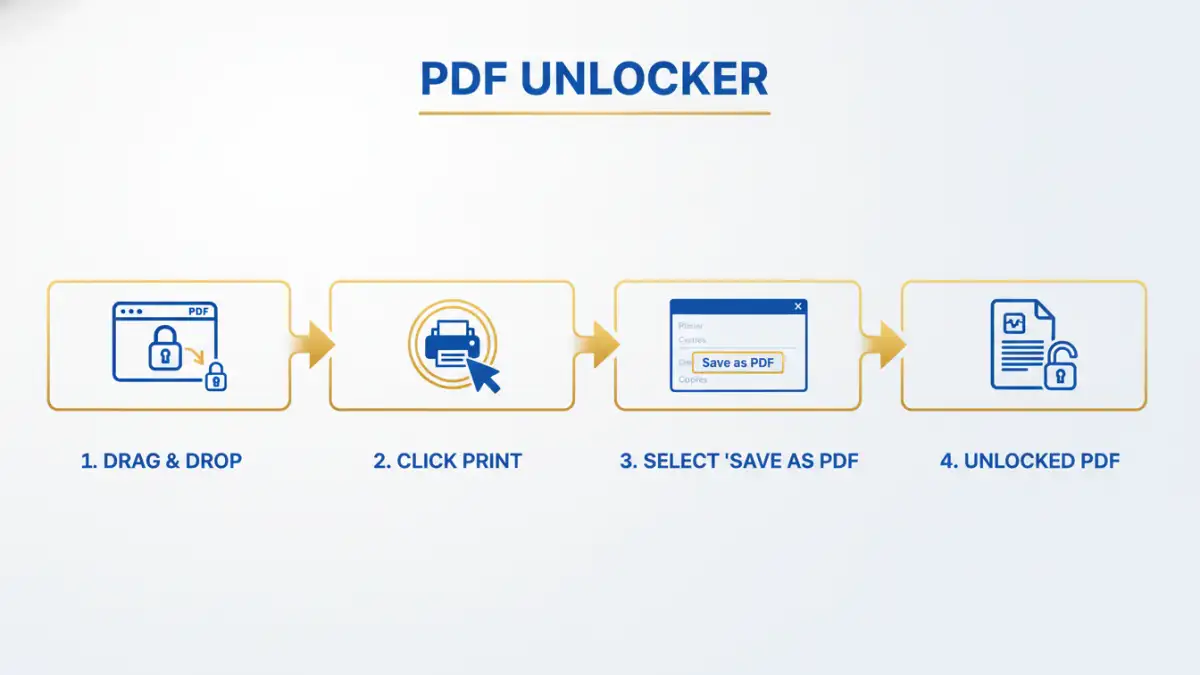
Here are the exact steps we followed, which ultimately saved the day:
- Open in Browser: Instead of using a dedicated PDF reader, I had him drag and drop the locked PDF file directly into a new Google Chrome tab. Most modern browsers like Chrome, Firefox, and Edge can render PDFs natively.
- Access the Print Dialog: Once the document was open and visible in the browser, I told him to press `Ctrl+P` (or `Cmd+P` on a Mac) to open the print dialog. The browser's ability to 'see' the document meant it could also send it to a printer.
- Change the Destination: In the print menu, instead of selecting his physical office printer, he chose the 'Save as PDF' option from the destination dropdown menu. This is a standard feature in most operating systems and browsers.
- Save the New File: He clicked 'Save' and chose a new name for the file. The browser effectively 'printed' a brand new PDF from the visual data it was rendering, creating an unlocked, unrestricted copy.
Within minutes, he had a clean, printable version of the legal brief, free of any printing restrictions. The relief in his voice was palpable. We had successfully created a version of the recovered password protected document without ever needing the original password.
Lessons Learned in Legal Document Security
While we celebrated the quick win, this incident served as a critical lesson in legal document security. A last-minute scramble is not a sustainable workflow for sensitive information. We discussed implementing a better system moving forward to prevent this from happening again.
Key takeaways include using a shared, secure team password manager like 1Password or Bitwarden for all document passwords. This creates a centralized, encrypted repository that designated team members can access. We also talked about establishing a clear protocol for naming conventions and password storage, ensuring that security doesn't become a bottleneck, especially when facing tight deadlines.
Document Recovery Method Comparison
| Method | Complexity | Best For | Security Risk |
|---|---|---|---|
| Browser 'Print to PDF' | Low | Bypassing Owner (Permissions) Passwords | Very Low |
| Online Recovery Tools | Low | Simple Owner or weak User Passwords | High (document is uploaded to a third-party server) |
| Desktop Brute-Force Software | High | Recovering forgotten User (Open) Passwords | Low (file remains on your local machine) |
| Password Manager | Low (for storage) | Proactive prevention of password loss | Very Low (when using a reputable service) |