Protecting sensitive information within digital documents is a critical concern for individuals and businesses alike. Whether you're dealing with confidential reports, financial statements, or personal records, ensuring that your PDF files are secure from unauthorized access is paramount. While many tools offer PDF encryption, leveraging the power and flexibility of Python can provide a highly customizable and automated solution for your security needs.
In my work, I've often found that manual processes for securing documents are time-consuming and prone to error. Developing custom scripts using Python has been a game-changer for batch processing and integrating security protocols directly into workflows. This approach allows for granular control over encryption strength and password management, which is essential for robust data protection.
Table of Contents
Understanding PDF Encryption
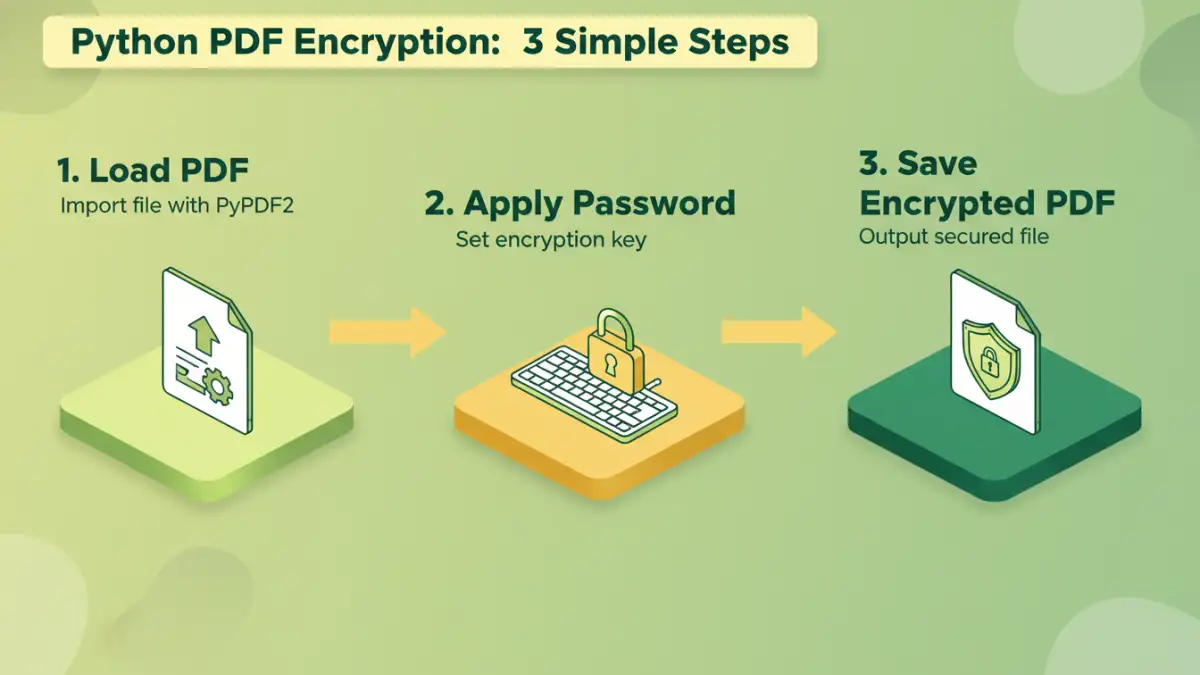
PDF encryption is the process of encoding the content of a PDF document so that it can only be accessed or modified by individuals who possess the correct decryption key, typically a password. This ensures confidentiality and integrity of the document's data.
How PDF Encryption Works
PDF encryption relies on cryptographic algorithms to scramble the document's data. When a PDF is opened, the software checks if the provided password matches the one used for encryption. If it matches, the algorithm is reversed, and the document is displayed in its original form. Without the correct password, the content remains unreadable.
Choosing the Right Python Library

Python's extensive ecosystem offers several libraries that can help with PDF manipulation, including encryption. The choice of library often depends on the specific requirements, such as the complexity of encryption needed or the ease of use.
Popular Libraries for PDF Handling
For straightforward password protection, libraries like PyPDF2 are often sufficient. For more complex scenarios involving advanced encryption standards or digital signatures, libraries like ReportLab (for generation) or potentially integrating with external tools might be necessary.
Basic PDF Encryption with PyPDF2
PyPDF2 is a popular, pure-Python library that can merge, split, crop, and transform PDF pages. It also supports basic PDF encryption, which is useful for setting owner passwords to restrict printing or copying.
Code Example: Setting a User Password
Here’s a simple example demonstrating how to encrypt a PDF file using a user password with PyPDF2. This password will be required to open the document.
from PyPDF2 import PdfReader, PdfWriter

def encrypt_pdf(input_pdf, output_pdf, password):
    reader = PdfReader(input_pdf)
    writer = PdfWriter()

    # Add all pages from the reader to the writer
    for page_num in range(len(reader.pages)):
        writer.add_page(reader.pages[page_num])

    # Encrypt the PDF with a user password
    writer.encrypt(password)

    # Write the encrypted PDF to a new file
    with open(output_pdf, 'wb') as f:
        writer.write(f)

# Example usage:
# encrypt_pdf('original.pdf', 'encrypted.pdf', 'my_secret_password')
# print("PDF encrypted successfully!")
This script takes an input PDF, adds all its pages to a new PDF writer object, and then encrypts it using the provided password before saving it as a new file. The user will need to enter 'my_secret_password' to open 'encrypted.pdf'.
Advanced Encryption Techniques
While PyPDF2 offers basic encryption, it primarily uses the older RC4 algorithm. For more robust security, especially for sensitive corporate data, you might need stronger encryption methods like AES.
Using Libraries for AES Encryption
Implementing AES encryption directly for PDFs can be complex, as it often involves understanding PDF internals and specific encryption handlers. Libraries like pdfrw or more specialized commercial SDKs might be required for this level of security. However, for many common use cases, the password protection offered by PyPDF2 is sufficient.
Secure PDF Generation
Beyond encrypting existing PDFs, you might need to generate secure PDFs from scratch. Libraries like ReportLab can be used to create PDFs programmatically, and then you can apply encryption using PyPDF2 or similar tools.
Generating and Encrypting PDFs
The typical workflow involves using a library like ReportLab to create the PDF content, saving it to a temporary file, and then using PyPDF2 to encrypt that file with a password before delivering it to the user.
from reportlab.pdfgen import canvas
from PyPDF2 import PdfReader, PdfWriter

def create_and_encrypt_pdf(output_filename, password, content_text):
    # Create a temporary PDF with content
    temp_pdf_path = 'temp_unencrypted.pdf'
    c = canvas.Canvas(temp_pdf_path)
    c.drawString(100, 750, content_text)
    c.save()

    # Now encrypt the temporary PDF
    reader = PdfReader(temp_pdf_path)
    writer = PdfWriter()
    writer.add_page(reader.pages[0])
    writer.encrypt(password)

    # Write the final encrypted PDF
    with open(output_filename, 'wb') as f:
        writer.write(f)

    # Clean up temporary file (optional)
    import os
    os.remove(temp_pdf_path)

# Example usage:
# create_and_encrypt_pdf('secure_report.pdf', 'report_pass', 'This is a confidential report.')
# print("Secure PDF generated and encrypted!")
This combined approach allows for both dynamic content creation and robust security, forming the basis of secure pdf generation workflows.
Best Practices for PDF Security
When encrypting PDF files, it's essential to follow best practices to ensure maximum security and usability.
Password Management and Encryption Strength
Always use strong, unique passwords for sensitive documents. Avoid common words or easily guessable patterns. If your requirements demand it, investigate libraries or methods that support stronger encryption algorithms like AES-256. Regularly review and update your security protocols.
Comparison Table
| Method | Pros | Cons | Use Case |
|---|---|---|---|
| PyPDF2 Basic Encryption | Free, pure Python, easy to implement for user passwords | Uses older RC4 encryption, limited to user passwords (opening), not owner permissions | Securing personal documents, simple password protection |
| ReportLab + PyPDF2 | Allows programmatic PDF generation and subsequent encryption | Requires two libraries, encryption strength limited by PyPDF2 | Secure pdf generation from data sources |
| Advanced Libraries/SDKs | Support for stronger encryption (AES), digital signatures, fine-grained permissions | Often commercial, may require external dependencies, steeper learning curve | Enterprise-level security, highly sensitive data, compliance requirements |