Working with sensitive documents is a daily reality for many professionals. Whether it's financial reports, client contracts, or personal information, keeping these files secure is paramount. Often, this involves password-protecting them. Two of the most common document formats we encounter are PDF and DOCX. But when it comes to security, how do they stack up against each other? Understanding the nuances of pdf encryption versus docx encryption can make a significant difference in safeguarding your data.
Having dealt with numerous security protocols and file handling over the years, I've seen firsthand how different file types handle encryption. It’s not always as straightforward as just adding a password. The underlying technology and the software used play a crucial role in how robust that protection actually is. Let's break down the differences between an encrypted PDF and an encrypted DOCX to help you make informed decisions about your document security.
Table of Contents
Understanding the Basics of Document Security
At its core, document security aims to prevent unauthorized access, modification, or distribution of information. Encryption is a primary method used to achieve this. It scrambles the data within a file, making it unreadable without a specific key – usually a password. This ensures that even if a file falls into the wrong hands, the contents remain confidential.
The effectiveness of encryption depends heavily on the algorithm used and the strength of the password. Modern encryption standards are quite robust, but weak passwords can still render even the strongest encryption vulnerable. It’s a layered approach where both the technology and user practices matter.
PDF Encryption Explained
PDF (Portable Document Format) was designed by Adobe to present documents consistently across different platforms and software. When it comes to security, Adobe Reader and Acrobat offer robust encryption capabilities for PDFs.
How PDF Encryption Works
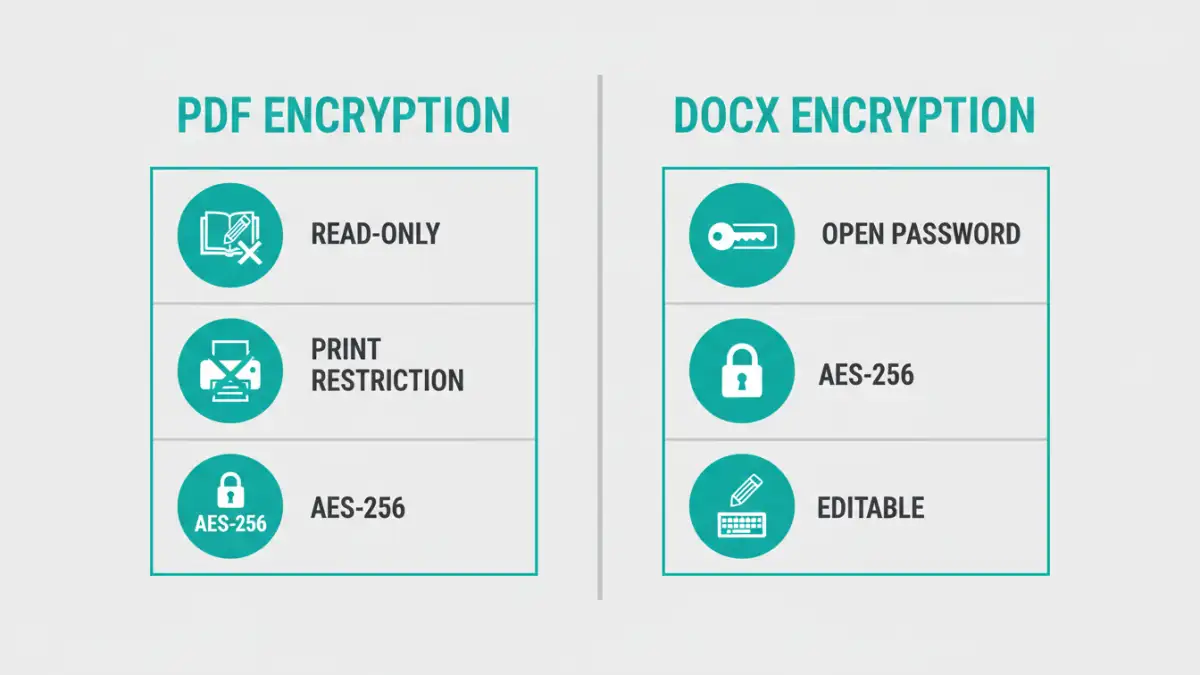
PDFs can be encrypted using various methods, but the most common involves assigning a password to restrict opening the document or to limit specific actions like printing or copying text. Older PDFs might use older, weaker encryption like 40-bit RC4, while modern standards support much stronger algorithms like 128-bit AES (Advanced Encryption Standard). When you save a PDF with a password, the application encrypts the file’s content stream.
The strength of PDF encryption is generally considered very good, especially when using AES-256, which is a widely adopted industry standard. Many third-party tools also allow for PDF encryption, but it's always best to use reputable software to ensure the encryption is implemented correctly and securely. I've often found that using the native features of Adobe Acrobat provides the most reliable encryption for PDFs.
DOCX Encryption Explained
DOCX is the default file format for Microsoft Word documents since Office 2007. Microsoft has also built-in security features, including password protection, directly into Word.
How DOCX Encryption Works
When you encrypt a DOCX file, Word uses a password to lock the document. Historically, Word used older encryption standards, but newer versions (Office 2007 and later) employ AES-256 encryption, which is considered very secure. The password protection can be set to require a password to open the document entirely.
Unlike PDFs, which are often viewed as final documents, DOCX files are typically meant for further editing. This difference in purpose can sometimes influence how encryption is implemented. While Word's AES-256 encryption is strong, the fact that the file is designed for editing means that if someone gains access to an unlocked DOCX file, they can easily modify it. This is a key distinction when considering file encryption for different purposes.
Encrypted PDF vs DOCX: Key Differences and Use Cases
When comparing an encrypted PDF versus an encrypted DOCX, several factors come into play, including the intended use, the level of security required, and the user experience. PDFs are generally seen as more secure for final distribution because they are harder to edit. This makes them ideal for contracts, invoices, or reports where maintaining the original content is crucial.
DOCX files, on the other hand, are better suited for collaborative work or documents that will undergo revisions. While they can be secured with strong passwords, their inherent editability means they are less ideal for situations demanding absolute content integrity after distribution. I often advise clients to convert their final documents to PDF before encrypting them if the primary concern is preventing unauthorized edits.
The choice between encrypted PDF and DOCX also depends on the software used. While both formats support strong AES-256 encryption, the implementation and user interface for setting passwords can vary. For instance, some online tools might offer PDF encryption but have limited or less secure options for DOCX files.
Best Practices for Secure Documents
Regardless of whether you choose an encrypted PDF or an encrypted DOCX, several best practices will enhance your document security. Firstly, always use strong, unique passwords. Avoid simple words, common phrases, or personal information. Consider using a password manager to generate and store complex passwords.
Secondly, be mindful of where you store encrypted files. Cloud storage can be convenient but ensure it has robust security measures. For highly sensitive documents, consider encrypting the entire drive or using dedicated secure file-sharing services. Finally, understand the limitations of your chosen encryption method and software. Regularly review your security practices and update them as needed.
Comparison Table
| Feature | Encrypted PDF | Encrypted DOCX | Considerations |
|---|---|---|---|
| Primary Use Case | Final distribution, archiving, content integrity | Collaboration, editing, drafts | PDFs are harder to edit after encryption |
| Encryption Strength | Supports AES-256 (modern versions) | Supports AES-256 (Office 2007+) | Both offer strong encryption with proper implementation |
| Ease of Editing | Difficult to edit without decryption | Easy to edit after decryption | DOCX is designed for editing |
| Software Dependence | Adobe Acrobat, many third-party tools | Microsoft Word, compatible office suites | Native tools generally offer best security |
| Security Focus | Content protection, preventing unauthorized viewing/actions | Restricting access to the file | PDFs better for read-only security |