
Ensuring sensitive documents remain secure and compliant with regulations is a constant challenge for businesses. The sheer volume of data, coupled with evolving threats and stringent legal requirements, makes manual processes prone to errors and inefficiencies. This is where workflow automation for document security compliance steps in, offering a robust solution to safeguard information and streamline adherence.
Over my years in software engineering, I've seen firsthand how critical it is to have a well-defined and automated process for handling sensitive files. Many organizations struggle with inconsistent application of security policies, leading to potential breaches or audit failures. Implementing automated workflows isn't just about technology; it's about creating a more secure and reliable operational framework.
Table of Contents
Understanding the Basics
At its core, document security compliance involves protecting sensitive information from unauthorized access, modification, or disclosure, while also meeting legal and regulatory obligations. This can range from data privacy laws like GDPR and CCPA to industry-specific standards like HIPAA or SOX. Without proper controls, businesses risk hefty fines, reputational damage, and loss of customer trust.
A document security workflow outlines the sequence of steps and controls applied to a document throughout its lifecycle, from creation to archival or destruction. This includes access controls, encryption, auditing, and retention policies. When these workflows are manual, they often become bottlenecks, leading to delays and security gaps.
Key Concepts in Document Security
Several key concepts underpin effective document security. Access control ensures only authorized personnel can view or modify specific documents. Encryption transforms data into an unreadable format, protecting it even if it falls into the wrong hands. Auditing provides a trail of who accessed what, when, and why, crucial for compliance and incident investigation. Finally, data retention and disposal policies dictate how long documents are kept and how they are securely deleted, preventing unnecessary data accumulation.
Key Benefits of Automation

Automating document security workflows brings significant advantages. Firstly, it drastically reduces the potential for human error, a leading cause of security incidents. Automated processes apply security policies consistently, every time, without fail. This reliability is paramount for maintaining compliance and defending against sophisticated threats.
Secondly, automation enhances efficiency. Tasks like classifying documents, applying encryption, routing for approvals, and archiving can be performed much faster and with fewer resources. This frees up valuable employee time to focus on more strategic initiatives rather than routine security tasks. The speed also means quicker response times to security events or compliance requests.
Enhanced Compliance and Reduced Risk
One of the most compelling reasons to automate is the improvement in regulatory document security. Automated systems can be configured to adhere strictly to specific compliance mandates, generating audit logs automatically and ensuring data retention policies are met. This significantly lowers the risk of non-compliance penalties and makes audits smoother and less stressful. By minimizing manual intervention, the chances of accidental data exposure or policy violations are greatly diminished.
Implementing Automation
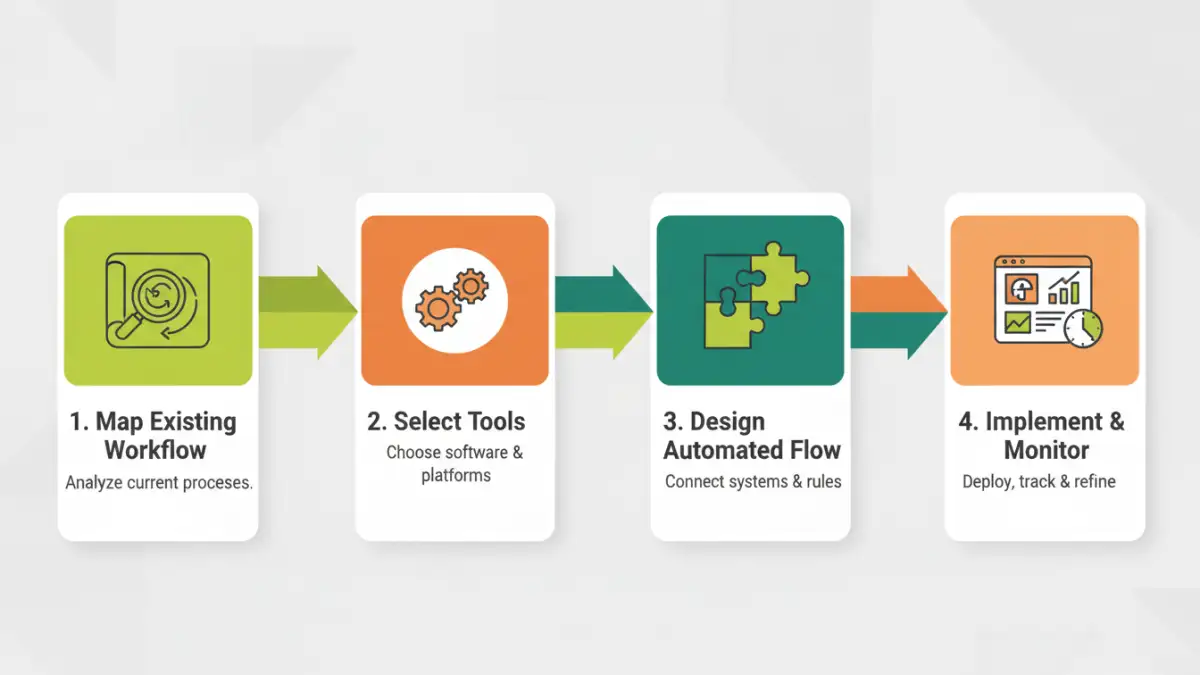
Getting started with workflow automation for document security involves several steps. The first is to map out your existing document workflows. Identify where sensitive documents are handled, what security measures are currently in place, and where the pain points and risks lie. This analysis will form the foundation for designing your automated solution.
Next, select the right tools. Many software solutions offer workflow automation capabilities tailored for document management and security. These can include features like automated document classification, policy enforcement, access control management, and secure sharing. Integration with existing systems like cloud storage or collaboration platforms is also a key consideration.
Designing Automated Workflows
Once you understand your current state and have chosen your tools, you can design the automated workflows. This might involve setting up rules for automatically encrypting documents based on their content or metadata, establishing multi-factor authentication for accessing highly sensitive files, or creating automated approval chains for document sharing. The goal is to build a system that guides documents through a secure, compliant path with minimal manual input.
Best Practices for Success
To ensure the success of your document security workflow automation, several best practices should be followed. Continuous monitoring and auditing are essential. Even automated systems need oversight to ensure they are functioning as intended and to detect any anomalies. Regularly review audit logs and security reports.
Employee training is also critical. While automation reduces manual tasks, employees still play a role in security. They need to understand the importance of the automated processes and how to interact with them correctly. Proper training ensures user adoption and reinforces the overall security posture of the organization.
Regular Reviews and Updates
The threat landscape and regulatory requirements are constantly evolving. Therefore, it's vital to regularly review and update your automated workflows. Periodically assess the effectiveness of your security controls and make adjustments as needed. This proactive approach ensures your document security remains robust and compliant over time.
Common Challenges and Solutions
Implementing workflow automation isn't without its hurdles. One common challenge is the initial cost of software and implementation. However, this investment often yields significant long-term savings through reduced risk of breaches and improved operational efficiency. The return on investment can be substantial.
Another challenge can be resistance to change from employees accustomed to manual processes. Clear communication about the benefits of automation, coupled with comprehensive training and support, can help overcome this. Highlighting how automation simplifies their tasks and reduces their exposure to risk can foster acceptance.
Comparison Table: Document Security Workflow Tools
| Tool Type | Key Features | Pros | Cons | Ideal For |
|---|---|---|---|---|
| Document Management Systems (DMS) with Workflow Automation | Automated classification, access control, audit trails, retention policies | Centralized control, comprehensive security features, integration capabilities | Can be complex, higher cost | Medium to large organizations needing robust control |
| Cloud Storage with Built-in Security Features | Encryption at rest and in transit, granular permissions, version history | Ease of use, accessibility, scalable | May lack advanced workflow customization, reliance on provider's security | Small to medium businesses, remote teams |
| Dedicated Workflow Automation Platforms | Drag-and-drop interface, integration with multiple apps, process monitoring | High customization, flexibility, efficiency gains | Requires integration effort, may need separate security tools | Organizations with complex, multi-step processes |
| Scripting and Custom Solutions | Tailored to specific needs, high control | Maximum flexibility, cost-effective for unique requirements | Requires technical expertise, ongoing maintenance | Organizations with very specific, unique security needs |