
I recently helped a colleague who couldn't access an important encrypted file because the password was stored in an unsecured note, and he'd forgotten which one. This common scenario highlights a significant challenge in modern workplaces: managing passwords for sensitive documents. While encrypting documents is a vital security measure, the manual handling of countless passwords can quickly become a bottleneck and a security risk in itself.
Automating password management for secured documents isn't just about convenience; it's about establishing a robust, consistent security posture. It ensures that critical information remains protected without creating new vulnerabilities through human error or inconsistent practices. As a software engineer, I've seen firsthand how well-implemented automation can transform security workflows.
Table of Contents
The Challenge of Document Passwords
Many organizations rely on password protection for individual documents, such as PDFs, Word files, or Excel spreadsheets, to control access to sensitive information. However, the sheer volume of these protected files can lead to a chaotic system of password storage and retrieval. This often results in weak or reused passwords, or passwords being written down in insecure locations.
The Human Element
Human memory is fallible, and relying on individuals to remember unique, complex passwords for every document is unrealistic and prone to error. This often leads to users creating simple, easy-to-guess passwords or reusing the same password across multiple documents. Both practices severely undermine the very security they are meant to provide.
Additionally, the process of sharing password-protected documents with collaborators can be cumbersome. Manually sharing passwords, whether through email or chat, introduces further points of vulnerability. A streamlined approach is essential to mitigate these risks.
Core Principles of Automated Password Management

Automating the handling of passwords for documents revolves around several key principles designed to enhance security, efficiency, and usability. The goal is to remove manual intervention wherever possible, reducing the potential for human error and increasing compliance with security policies.
One fundamental principle is centralization. Instead of passwords being scattered across individual notes or internal drives, they are stored and managed in a secure, central system. This allows for consistent application of security policies and easier auditing of access.
Practical Approaches to Automate Document Passwords
There are several ways to approach automating the management of passwords for your secured documents, ranging from built-in software features to dedicated third-party tools. The best method often depends on your specific needs, the types of documents you're securing, and your existing IT infrastructure.
I've seen companies effectively combine different strategies, such as using a enterprise-grade password manager for general access and scripting for specific, high-volume document processes. The key is to find solutions that integrate seamlessly into your existing workflow without introducing new complexities.
Using Built-in Features
Many common applications, like Microsoft Office and Adobe Acrobat, offer built-in functionalities to protect documents with passwords. While these aren't full automation solutions, they provide the initial layer of protection. For instance, you can programmatically set passwords for Word or Excel files using VBA scripts, or for PDFs using command-line tools or specific libraries.
This approach is excellent for small-scale automation or integrating into existing internal applications. It leverages tools you already use, minimizing the need for new software. However, managing these passwords still requires a separate strategy.
Leveraging Dedicated Tools
For comprehensive password management documents, dedicated password managers are invaluable. Enterprise-grade password managers can store and auto-fill credentials not just for websites, but also for applications and documents. Some even offer API access, allowing for integration into custom scripts or internal systems to automate the encryption and decryption process of files based on user roles or specific triggers.
Beyond general password managers, some document management systems (DMS) offer integrated security features, including automated password generation and application for files uploaded to the system. These systems are designed to handle the full lifecycle of a document, including its security.
Implementing a Secure Workflow
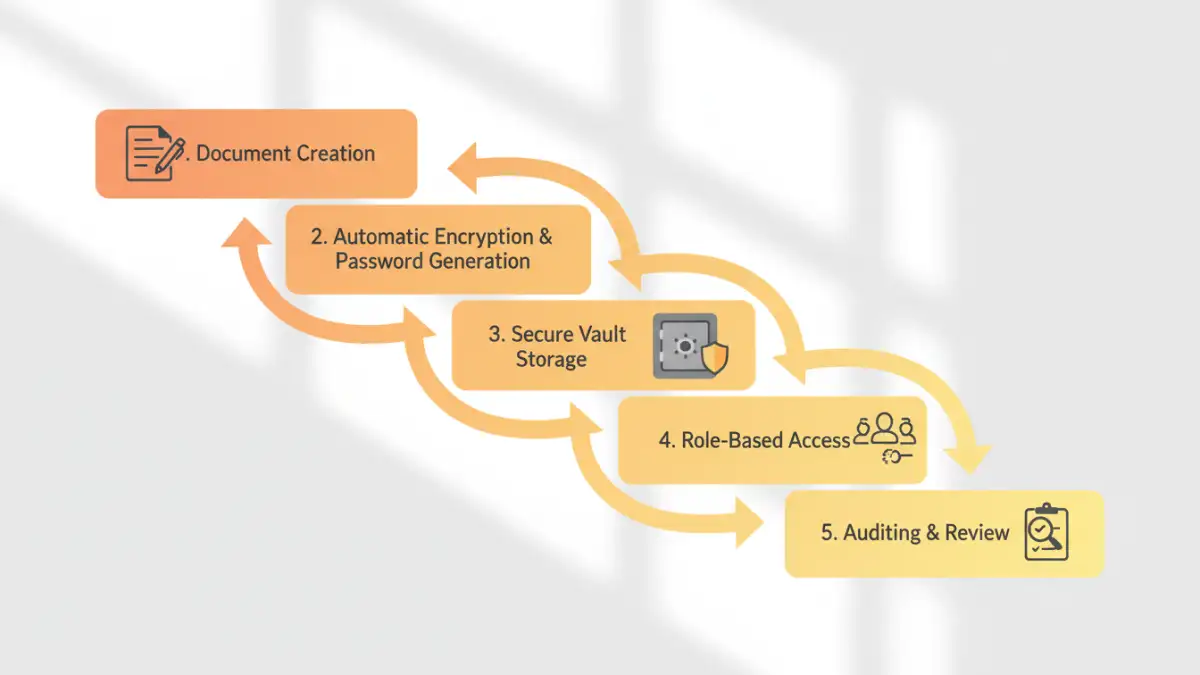
Automating password management for documents requires more than just tools; it demands a well-defined workflow. This involves understanding when and how documents are secured, who needs access, and how access is revoked. A structured approach ensures that automation enhances security rather than creating new blind spots.
Consider the lifecycle of a sensitive document. From creation and initial encryption to sharing, storage, and eventual archival or deletion, each stage presents an opportunity for automation. For example, documents could be automatically encrypted upon creation in a specific folder, with passwords stored in a secure vault and access granted based on group membership.
Best Practices for Long-Term Security
Even with automation, maintaining robust document security requires adherence to best practices. Regularly auditing your password policies, ensuring strong, unique passwords are being generated, and reviewing access permissions are critical steps.
Implementing multi-factor authentication (MFA) for access to your password management system adds another layer of defense. Also, ensure that all systems involved in the automation process are kept up-to-date with the latest security patches. Training users on the importance of secure document handling complements the technical controls you put in place.
Comparison Table: Manual vs. Automated Document Password Management
| Feature | Manual Approach | Automated Approach | Security Implications |
|---|---|---|---|
| Password Generation | User-defined, often weak/reused | System-generated, strong, unique | High risk of compromise vs. significantly reduced risk |
| Password Storage | Unsecured notes, memory, spreadsheets | Encrypted vault, secure database | High risk of exposure vs. robust protection |
| Document Encryption | Manual application per document | Automatic upon creation/upload | Inconsistent application vs. consistent security |
| Access Sharing | Manual communication (email, chat) | Controlled access via roles/permissions | High risk of interception vs. secure, auditable sharing |
| Scalability | Poor, becomes unmanageable quickly | Excellent, handles large volumes easily | Bottlenecks, errors vs. efficiency, reliability |
| Auditing | Difficult, often non-existent | Detailed logs of access and changes | No accountability vs. full accountability |