
Working with sensitive digital documents is a daily reality for many professionals. Whether it's client data, financial records, or proprietary information, ensuring its safety is paramount. A proactive approach to understanding potential threats and vulnerabilities is key to maintaining robust digital document security. This involves more than just setting a password; it requires a structured process to evaluate your current safeguards and identify areas for improvement.
Many organizations and individuals overlook the importance of a systematic review until a breach occurs. However, by implementing a regular document safety assessment, you can significantly reduce the risk of data loss or unauthorized access. This process helps you understand where your digital assets are most vulnerable and what steps you need to take to fortify them.
Table of Contents
Understanding Potential Risks
Before you can protect your digital documents, you need to understand what you're protecting them from. Risks can be broadly categorized into several areas. These include technical threats like malware, phishing attacks, and unauthorized network access. Human error, such as accidental deletion or misconfiguration of security settings, also poses a significant risk.
Furthermore, physical risks like hardware theft or damage, and insider threats, where trusted individuals misuse their access, must be considered. A comprehensive document safety assessment begins with a thorough inventory of these potential dangers and how they might impact your specific digital assets.
Key Risk Categories
The primary categories of risk to digital documents include:
- Technical Threats: Malware, viruses, ransomware, hacking attempts, unauthorized access.
- Human Error: Accidental deletion, misconfiguration, sharing sensitive data incorrectly.
- Insider Threats: Malicious intent or negligence by employees or authorized users.
- Physical Threats: Device theft, hardware failure, natural disasters.
Steps for a Document Safety Assessment
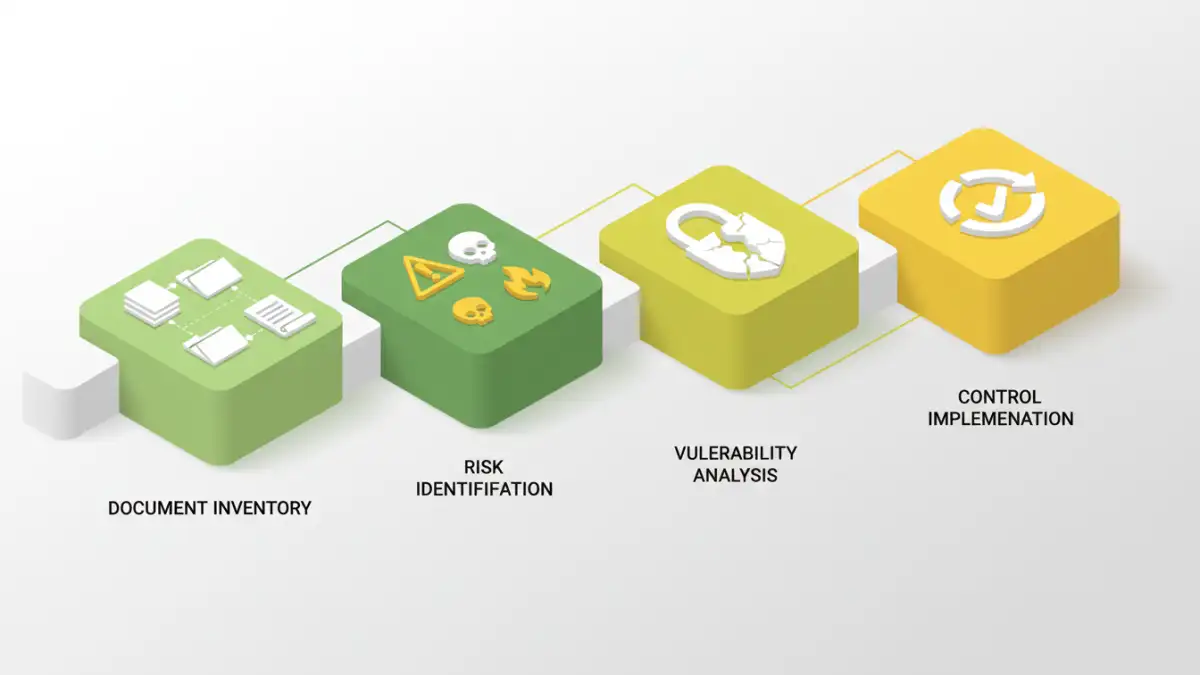
Conducting a thorough document safety assessment involves several key phases. It's a cyclical process designed to identify, evaluate, and mitigate risks. The first step is to identify all critical digital documents and where they are stored. This includes understanding the sensitivity and value of each document.
Next, you need to assess the current security measures in place for these documents. This involves looking at access controls, encryption methods, backup strategies, and physical security of the storage devices. Following this, you'll analyze the identified risks and their potential impact.
Identifying Vulnerabilities
Once you have a clear picture of your documents and current controls, the next crucial step is to actively identify vulnerabilities. This might involve penetration testing, security audits, or simply a detailed review of your systems and processes. Look for weak passwords, unpatched software, inadequate access controls, and insufficient data backup procedures.
Consider the entire lifecycle of a document, from creation to archival or deletion. Are there points where data is exposed? For instance, are documents left unsecured on public Wi-Fi, or are old backups not properly disposed of? A thorough vulnerability scan is essential for effective risk management.
Common Vulnerabilities to Check
Some common areas where vulnerabilities are found include:
- Weak or default passwords on accounts and devices.
- Lack of encryption for sensitive data at rest and in transit.
- Inadequate access controls, granting more permissions than necessary.
- Insufficient or untested backup and disaster recovery plans.
- Outdated software or operating systems lacking critical security patches.
- Lack of employee training on security best practices and phishing awareness.
Implementing Security Controls
After identifying risks and vulnerabilities, the focus shifts to implementing appropriate security controls. These controls are designed to mitigate the identified risks. This could involve technical solutions like deploying stronger encryption, multi-factor authentication, or intrusion detection systems. It also includes procedural changes such as establishing clear data handling policies and providing regular employee training.
Prioritize controls based on the severity of the risk and the potential impact on your organization. For example, encrypting highly sensitive financial reports should be a higher priority than securing internal memos. The goal is to create layers of security to protect your digital assets effectively.
Regular Review and Updates
The digital landscape is constantly evolving, with new threats emerging regularly. Therefore, your document safety assessment should not be a one-time event. It needs to be a continuous process. Schedule regular reviews, perhaps quarterly or annually, to reassess your risks and the effectiveness of your security controls.
Update your assessment whenever significant changes occur, such as adopting new technologies, expanding operations, or experiencing a security incident. This ongoing vigilance ensures that your digital document security remains robust and adaptable to new challenges.
Comparison Table: Document Security Methods
| Method | Description | Pros | Cons | Best For |
|---|---|---|---|---|
| Password Protection (Built-in) | Using native features in software like Word, Excel, or PDF readers to set passwords. | Easy to implement, no extra cost. | Weak passwords can be easily cracked, limited to file-level security. | Basic protection for individual files. |
| Full Disk Encryption (e.g., BitLocker, FileVault) | Encrypts the entire storage drive of a computer or device. | Protects all data on the device if lost or stolen. | Requires a strong master password/key, performance overhead. | Protecting data on laptops and mobile devices. |
| Cloud Storage Encryption | Documents stored in cloud services are encrypted, either by the provider or client-side. | Accessibility, automatic backups, provider security measures. | Reliance on provider's security, potential privacy concerns, requires internet access. | Collaborative work, remote access, general document storage. |
| Third-Party Encryption Tools | Dedicated software or online services for encrypting specific files or folders. | Strong encryption algorithms, advanced features (e.g., secure sharing). | Can involve costs, learning curve, or privacy concerns with online tools. | High-security needs, specific file types, enhanced sharing control. |