Working with password-protected documents can be frustrating, especially when you've forgotten the password or need to access a file urgently. While the OpenDocument Format (ODF) offers robust security features, attempting to bypass or remove these protections without proper knowledge can lead to significant problems. As someone who has spent years navigating complex file formats and security protocols, I've seen firsthand how easily users can fall into common traps.
These mistakes aren't just theoretical; they can result in corrupted files, lost data, or even security vulnerabilities. Understanding these pitfalls is crucial for anyone dealing with password-protected ODT, ODS, or ODP files. This guide will walk you through the common errors and provide insights on how to handle your secure documents responsibly.
Table of Contents
- Understanding OpenDocument Security
- Common OpenDocument Password Removal Mistakes
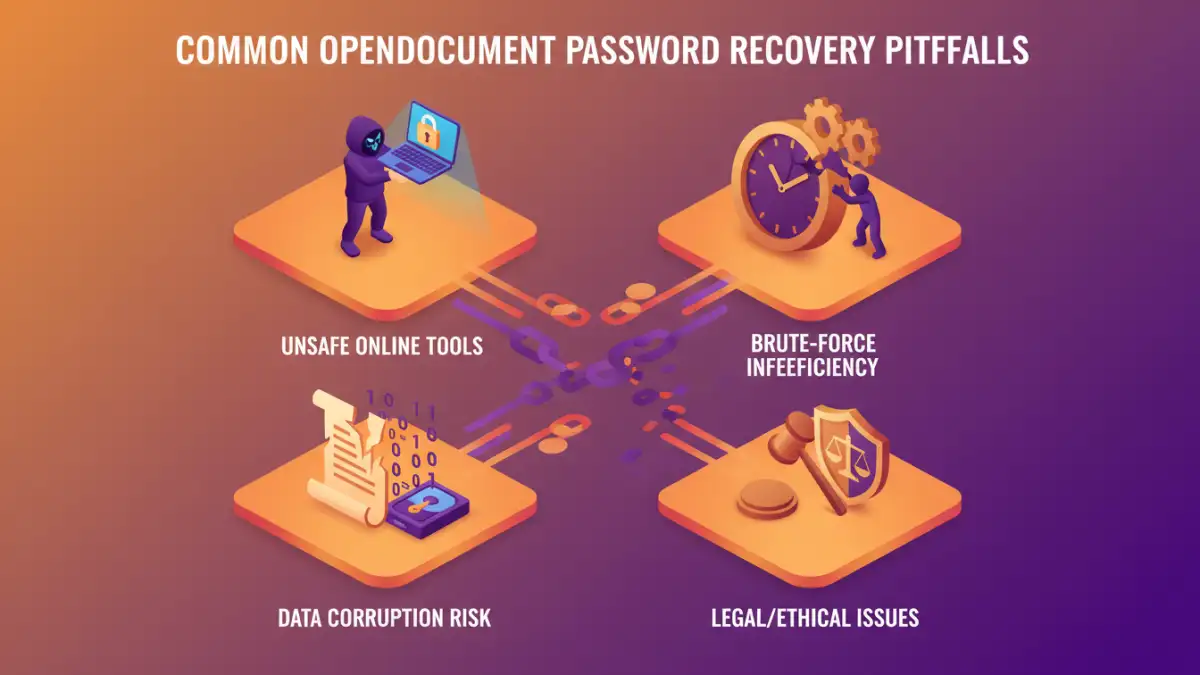
- Mistake 1: Relying Solely on Brute-Force Tools
- Mistake 2: Uncritical Use of Online Tools
- Mistake 3: Ignoring Data Integrity and Loss Risks
- Mistake 4: Overlooking Legal and Ethical Implications
- Best Practices for Secure Document Handling
Understanding OpenDocument Security
The OpenDocument Format, used by applications like LibreOffice and OpenOffice, employs encryption to protect files. When you set a password, the application encrypts the document's content, making it unreadable without the correct key (the password). This encryption is designed to be strong, preventing unauthorized access.
How Passwords Work
The password you set is used to generate the encryption key. Different versions of ODF might use various encryption algorithms, but the principle remains the same: the password is the gateway to decrypting your data. Without it, the encrypted content is just gibberish.
Common OpenDocument Password Removal Mistakes
Attempting to circumvent password protection often stems from a genuine need to access a forgotten file. However, the methods employed can inadvertently cause more harm than good. Awareness of these common errors is the first step toward a safer approach.
Mistake 1: Relying Solely on Brute-Force Tools
One of the most common approaches is using brute-force or dictionary attack software. These tools systematically try thousands or millions of password combinations until they find the correct one. While they can sometimes work for simple passwords, they are often time-consuming and have a low success rate with strong, complex passwords.
The primary issue here is the sheer computational power and time required. For a password that's even moderately complex (e.g., 8-12 characters with mixed case, numbers, and symbols), a brute-force attack could take weeks, months, or even years to complete. This is often impractical for urgent access needs.
Mistake 2: Uncritical Use of Online Tools
The internet is flooded with online tools claiming to remove passwords from ODT files instantly. While convenient, these services pose significant security and privacy risks. You are uploading your potentially sensitive document to a third-party server, and there's no guarantee how they handle your data or if the tool actually works as advertised.
Many of these tools are scams or malware distributors. Even legitimate-looking ones might not be compatible with the specific encryption used by your version of the ODF file. Uploading confidential information to an unknown online service is a major data security risk that should be avoided.
Mistake 3: Ignoring Data Integrity and Loss Risks
When you attempt password removal using unofficial methods or faulty tools, there's a high probability of corrupting the file. The encryption process is intricate, and any interruption or incorrect manipulation during decryption can render the document permanently unreadable. This means not only failing to recover the password but also losing the original document content.
This is particularly true if the tool you're using tries to force its way through the encryption. Instead of a clean decryption, it might overwrite or scramble critical parts of the file structure, leading to irreversible data loss. Always prioritize methods that aim for a safe, non-destructive recovery.
Mistake 4: Overlooking Legal and Ethical Implications
Password protection is a form of security. Attempting to bypass it on a document you do not own or have explicit permission to access can have legal consequences. Unauthorized access to protected information is a breach of privacy and potentially illegal, depending on the jurisdiction and the nature of the data.
Even if the document belongs to you, but was encrypted by someone else (e.g., a colleague, a shared project), ensure you have the right to attempt password removal. Ethical considerations are as important as technical ones in secure document handling.
Best Practices for Secure Document Handling
Instead of resorting to risky password removal techniques, focus on proactive and safe methods. Remembering your passwords or using secure password management systems is the most effective strategy. If you genuinely need to recover a forgotten password, consider these approaches:
- Password Managers: Use a reputable password manager to store and manage your document passwords securely. This is the best way to avoid forgetting them in the first place.
- Official Software Features: Some document editing suites might offer recovery options or password hints if configured beforehand. Check the documentation for your specific ODF application.
- Consult a Professional: For critical business documents where data loss is not an option, consider consulting a data recovery specialist. They may have advanced tools and expertise, but this can be costly.
- Recreate the Document: If the document is not overly complex and the data is essential, sometimes the safest and quickest solution is to recreate it from scratch, perhaps using a new password.
The key takeaway is to prioritize the integrity and security of your data. Avoid shortcuts that promise quick fixes but carry substantial risks. Understanding the ODT password recovery pitfalls means recognizing when a method is too risky.
Comparison Table: Approaches to Forgotten Passwords
| Method | Pros | Cons | Best For |
|---|---|---|---|
| Brute-Force Tools | Can work for simple passwords | Extremely time-consuming, low success rate for complex passwords, can lead to file corruption | Very simple, short passwords; desperation |
| Online Password Removal Tools | Fast, no software installation | Major security/privacy risks, often unreliable, potential malware | Non-sensitive, disposable files (use with extreme caution) |
| Password Managers | Secure storage, easy retrieval, password generation | Requires initial setup, potential subscription costs | Preventing forgotten passwords, long-term security |
| Professional Data Recovery | Expertise, advanced tools, high success rate for complex cases | Expensive, time-consuming, not always guaranteed | Critical business documents with irreplaceable data |