
Working with password-protected documents can be frustrating, especially when you've forgotten the password or inherited a file without one. OpenDocument files, commonly saved as .odt, .ods, and .odp, are no exception. While encryption is a vital security feature, losing access can create significant hurdles for individuals and businesses alike.
My background in software engineering has shown me how crucial document security is, but also how common it is to encounter situations where access is lost. This article will guide you through what you need to know about OpenDocument password removal tools, the methods involved, and important considerations.
Table of Contents
Understanding OpenDocument Security
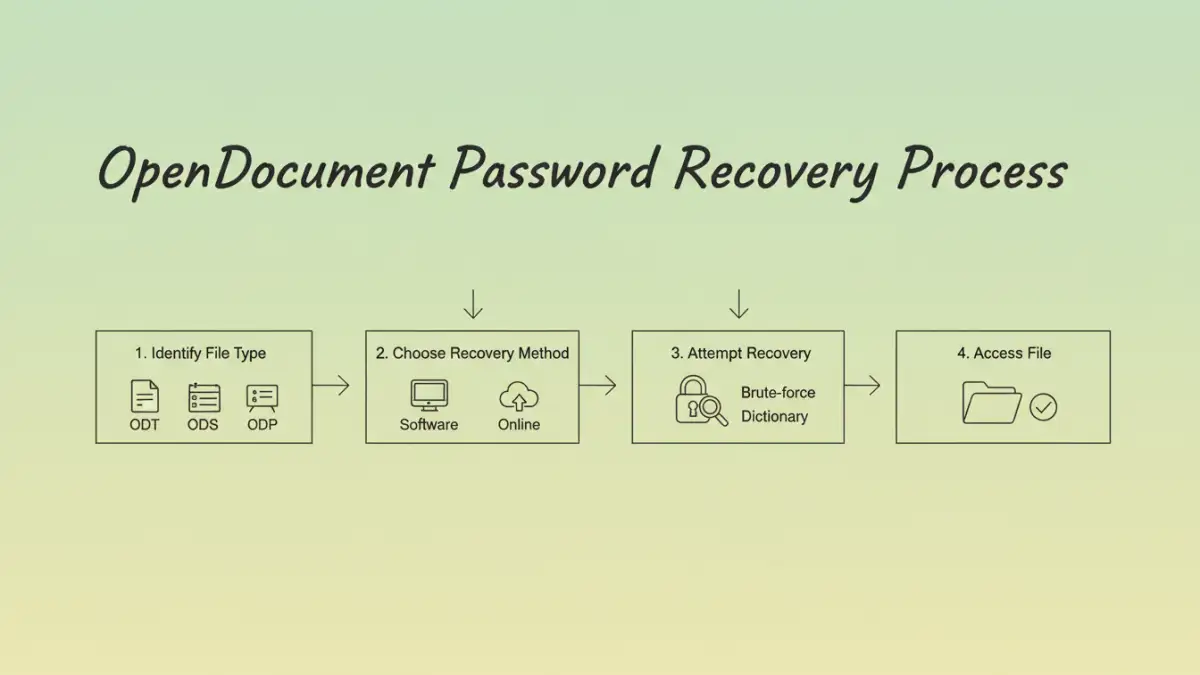
OpenDocument formats, like ODT (text documents), ODS (spreadsheets), and ODP (presentations), support password protection. This feature encrypts the file's content, making it unreadable without the correct password. The strength of this encryption can vary depending on the software used to create and protect the document.
How Encryption Works
When you set a password on an OpenDocument file, the software uses an encryption algorithm to scramble the data. This process requires a key derived from your password. Without the correct password, the key cannot be generated, and thus, the data remains unreadable. This is a standard security measure designed to protect sensitive information from unauthorized access.
Methods for Recovery

Accessing a password-protected OpenDocument file when the password is unknown can be challenging. There isn't a universal master key. Instead, recovery typically involves trying to bypass or brute-force the password.
Brute-Force and Dictionary Attacks
These methods involve using specialized software to try numerous password combinations. A brute-force attack systematically attempts every possible character combination until the correct password is found. A dictionary attack is similar but uses a pre-defined list of common words and phrases. The success rate and time required depend heavily on the password's complexity and the tool's efficiency.
Online and Desktop Tools
Various OpenDocument password removal tools are available, both as downloadable desktop applications and online services. Desktop software often offers more processing power and features, while online tools provide convenience and accessibility without requiring installation. However, online tools can raise privacy concerns, as you are uploading your sensitive file to a third-party server.
Choosing the Right Tool
Selecting an appropriate tool is crucial. Consider the type of OpenDocument file you're working with (.odt, .ods, .odp) and the complexity of the password you suspect was used. Some tools are more effective for specific file types or password structures.
Factors to Consider
When evaluating ODT password recovery software or any file unlock tools, look for reliability, speed, and user reviews. Free tools may be tempting, but they often have limitations or can be less effective than paid options. Always ensure the software comes from a reputable source to avoid malware.
Important Considerations
It's vital to approach password recovery with realistic expectations. If a strong, complex password was used, recovery can be extremely time-consuming, potentially taking days, weeks, or even longer, depending on your hardware and the tool's capabilities. In some cases, recovery might not be feasible.
Furthermore, the legality and ethics of attempting to remove a password from a document you don't own or have authorization for are significant. Always ensure you have the right to access the file before attempting any recovery process. Respecting data privacy and security is paramount.
Best Practices for Document Security
To avoid future access issues, implement strong document security practices. Use memorable yet complex passwords, and consider using a password manager to store them securely. Regularly back up your important files, and keep password recovery tools only from trusted sources.
For enhanced protection, explore different encryption methods and document security software. Understanding the risks and benefits of various security measures will help you safeguard your data effectively without compromising accessibility.
Comparison Table: OpenDocument Password Recovery Methods
| Method | Pros | Cons | Use Case |
|---|---|---|---|
| Brute-Force Software | Can recover complex passwords with enough time. Handles various file types. | Time-consuming, requires significant processing power. May need paid versions for effectiveness. | When the password is unknown and recovery is essential. |
| Dictionary Attack Tools | Faster than brute-force for common or simple passwords. | Ineffective against strong, unique passwords. Limited by the dictionary size. | When the password might be a common word or phrase. |
| Online Recovery Services | Convenient, no installation required. Accessible from any device. | Potential privacy/security risks. Success rates can vary. Limited file size or number of uses. | For non-sensitive documents where privacy is less of a concern. |
| Manual Inspection/Exploits (Advanced) | May bypass certain encryption weaknesses (rare). | Requires deep technical expertise. Often outdated or specific to older software versions. Not generally recommended. | For security researchers or specific, known vulnerabilities. |