Working with password-protected documents can be frustrating, especially when you need quick access on your iPad. Whether it's a sensitive work file, a personal document, or a shared report, forgetting or losing the password can feel like a dead end. Fortunately, there are several reliable ways to open these encrypted PDFs directly on your Apple tablet.
As someone who's dealt with countless file security challenges over the years, I've found that the best approach often depends on the type of password and your familiarity with different tools. This guide will walk you through the most effective methods to unlock your PDF files on an iPad, ensuring you can access your information without unnecessary hassle.
Table of Contents
Understanding PDF Passwords
PDFs can have two main types of passwords: a 'user' or 'open' password, and an 'owner' or 'permissions' password. The user password prevents you from opening the document at all, requiring you to enter it before viewing any content. The owner password restricts certain actions like printing, copying text, or editing, even if you can open the PDF.
Types of PDF Passwords
Knowing which password you're dealing with is crucial. If you're trying to open an ipad password protected pdf, it's likely protected by an open password. If you can read the document but can't print or copy, it's protected by owner permissions. Most methods focus on removing open passwords, while permission restrictions can sometimes be bypassed more easily.
Methods to Unlock PDFs on iPad

Accessing password-protected PDFs on an iPad typically involves using either built-in browser capabilities, third-party online tools, or desktop software that can then sync the unlocked file to your device. Each method has its own set of advantages and potential drawbacks, particularly concerning security and ease of use.
Using a Web Browser
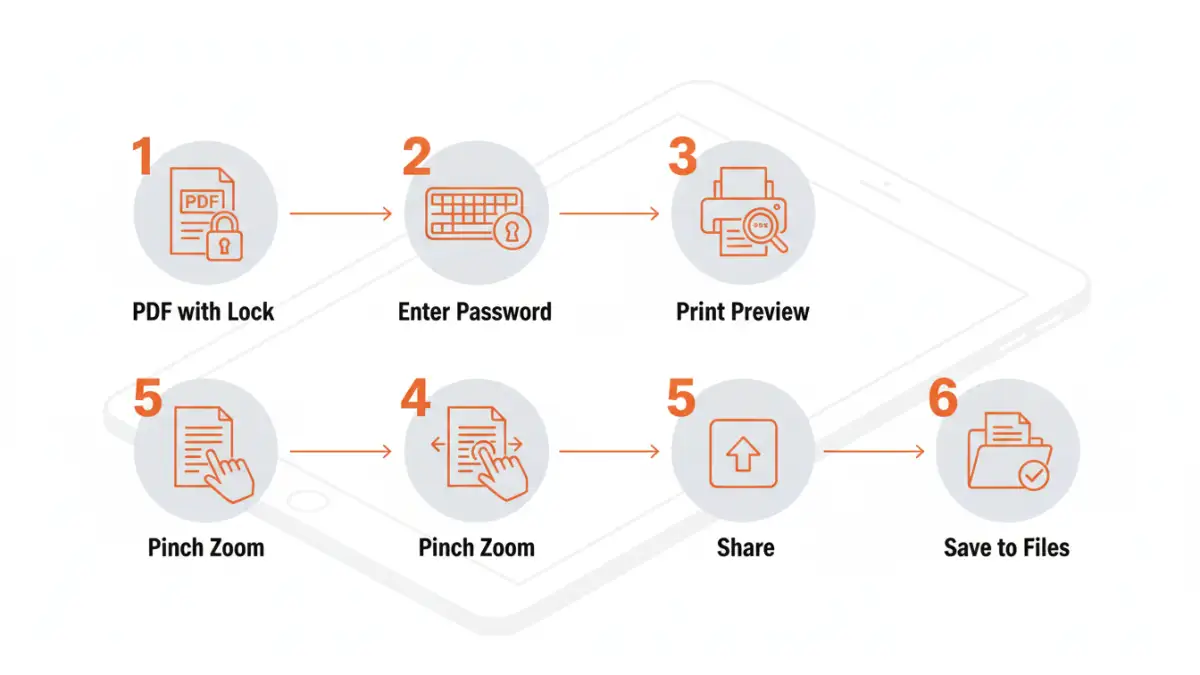
One of the simplest ways to unlock pdf ipad if you know the open password is by using your iPad's web browser, like Safari. This method doesn't require any extra software and is surprisingly effective for many scenarios. The trick is to 'print' the PDF to a new PDF file, effectively stripping the original password protection.
First, open the password-protected PDF in a compatible app on your iPad that prompts for the password. Enter the correct password. Once the PDF is open and viewable, look for a 'Share' option or a print function. If you select 'Print', you can then use a 'pinch-to-zoom' gesture on the print preview page to make it fill the screen. Afterward, tap the 'Share' button again, and select 'Save to Files' or 'Save PDF to iCloud Drive.' This creates a new, unlocked copy of the document. This is a great way to recover a PDF password if you have it but want a clean copy.
Leveraging Online PDF Unlockers
Numerous websites offer free tools to unlock password-protected PDFs. These services are convenient because they operate entirely within your web browser, meaning no software installation is necessary. Sites like Smallpdf, iLovePDF, or Adobe Acrobat online offer these functionalities.
To use an online tool, you'll typically upload your encrypted PDF file to their website, enter the correct open password when prompted, and the service will process and provide a download link for the unlocked PDF. Be mindful of privacy when using online services, especially for highly sensitive documents, as you are uploading your file to a third-party server. Ensure you are using reputable sites with clear privacy policies.
Considering Desktop Software
For more complex situations or if you frequently deal with password-protected files, dedicated desktop software can be a more robust solution. While these applications aren't run directly on the iPad, they can unlock PDFs that you can then transfer to your device via iCloud Drive, Dropbox, or email.
Software like PDFelement, Adobe Acrobat Pro, or specialized password recovery tools can handle various levels of encryption. Some tools even attempt to recover forgotten passwords, though this process can be time-consuming and isn't always successful, especially with strong passwords. Once unlocked on a computer, simply sync the file to your iPad for access.
Best Practices for PDF Security
While knowing how to unlock a PDF is useful, preventing the need to do so in the first place is often the better strategy. Always store your passwords securely, perhaps using a reputable password manager. If you're sharing a password-protected document, communicate the password through a separate, secure channel.
When creating password-protected PDFs, use strong, unique passwords that are difficult to guess. For permissions, only restrict what is absolutely necessary. Understanding how to open encrypted pdf ios is also about being prepared, so keeping backups of important documents is always a wise precaution.
Comparison Table: PDF Unlock Methods on iPad
| Method | Ease of Use | Security/Privacy | Password Required? | Best For |
|---|---|---|---|---|
| Browser 'Print' Trick | High | High (local processing) | Yes (Open Password) | Quick unlock with known password |
| Online PDF Unlocker Tools | Very High | Medium (third-party upload) | Yes (Open Password) | Convenience, frequent use, non-sensitive docs |
| Desktop Software | Medium | High (local processing) | Yes (Open Password), sometimes No (recovery) | Complex encryption, password recovery attempts |
| Password Managers | N/A (for unlocking) | Very High | N/A (for unlocking, used for storage) | Securely storing and retrieving passwords |