
In today's digital landscape, sharing images and videos online is effortless. However, this ease of access also means that our creative work can be easily copied, distributed, and used without permission. Protecting your visual content from unauthorized use is a significant concern for creators, businesses, and anyone who values their digital assets. This is where Digital Rights Management (DRM) steps in as a crucial technology.
Table of Contents
What is Digital Rights Management (DRM)?
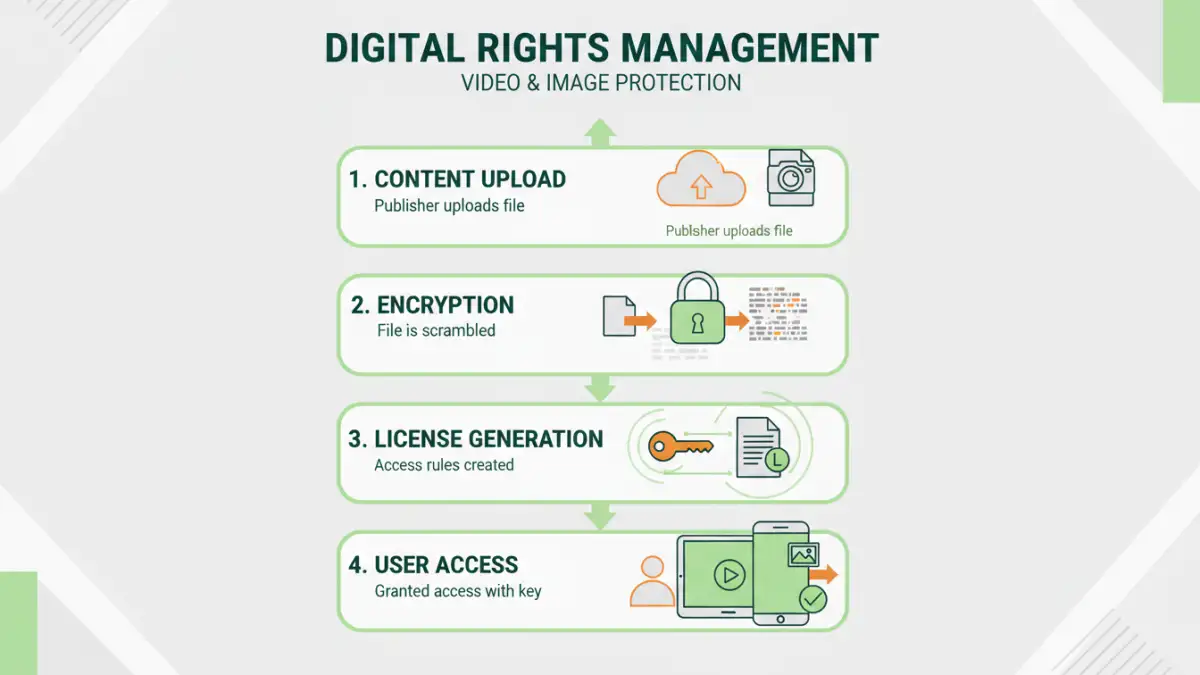
Digital Rights Management, or DRM, is a set of technologies used to control the use, modification, and distribution of copyrighted digital content. Think of it as a digital lock that ensures only authorized individuals can access and use your images and videos according to specific rules you set. It's designed to prevent piracy and protect the intellectual property of content creators.
This technology is widely used across various media, from e-books and music to software and, importantly, visual content like photos and videos. Its primary goal is to enable content owners to maintain control over how their work is consumed and shared in the digital realm.
How Does DRM Work for Images and Videos?

DRM for images and videos typically involves several components working together. When you apply DRM to your content, it's encrypted, and access is governed by a license. This license dictates what a user can do with the content – for instance, whether they can view it, download it, print it, or share it.
For video file protection, DRM systems often embed watermarks, restrict playback to specific devices or browsers, limit the number of views, or set expiration dates for access. Similarly, for images, DRM can prevent right-clicking to save, restrict downloading, or embed invisible digital watermarks that can trace unauthorized use. Over my years working with digital asset management systems, I've seen how robust DRM implementation can drastically reduce unauthorized sharing.
Encryption and Licensing
At its core, DRM uses encryption to scramble the content, making it unreadable without a decryption key. This key is usually tied to a digital license that is granted to the end-user upon purchase or authorization. The license contains the rules for accessing and using the content.
Access Control Mechanisms
DRM employs various mechanisms to enforce these rules. This can include preventing screen recording, disabling copy-paste functions, restricting printing, and controlling playback duration. For online image rights, this might mean preventing users from saving high-resolution versions or embedding the image on other websites.
Key Benefits of Implementing DRM
Implementing DRM offers several significant advantages for content creators and distributors. The most obvious benefit is enhanced copyright protection, ensuring that your work is not used without your consent or compensation. This is crucial for maintaining the value of your creative output.
Beyond copyright, DRM also enables new business models. For instance, you can offer rental services for videos with time-limited access or subscription services for viewing image galleries. It provides a framework for monetizing digital content more effectively and securely. Ultimately, it's about maintaining control and ensuring fair usage of your digital asset protection efforts.
DRM vs. Other Content Protection Methods
While DRM is a powerful tool, it's not the only method for protecting content. Simple measures like visible watermarks or copyright notices are easy to implement but can often be bypassed or ignored. They serve more as deterrents than robust protection mechanisms.
Another approach is using terms of service or licensing agreements. However, these are legal constructs that rely on enforcement after an infringement occurs, which can be time-consuming and costly. DRM, on the other hand, provides a technical barrier that actively prevents unauthorized access and copying from the outset, offering a more proactive form of copyright for media.
Comparison with Watermarking
Visible watermarks can deter casual copying but can also be visually distracting and may be cropped out or removed with image editing software. Invisible watermarks are more subtle but are primarily for tracing ownership rather than preventing access. DRM offers a more comprehensive solution by controlling access itself.
Implementing DRM Solutions
Implementing DRM can range from simple built-in features in some platforms to sophisticated enterprise-level solutions. For many photographers and videographers, using platforms that have built-in DRM capabilities can be the most straightforward approach. Services like Vimeo or specialized stock photo sites often provide these features.
For more complex needs, dedicated DRM software or services can be employed. These often offer granular control over permissions, detailed analytics on content usage, and integration with content delivery networks. Choosing the right solution depends on the type of content, your audience, and your specific protection requirements.
Challenges and Considerations
Despite its benefits, DRM is not without its challenges. Some users find DRM restrictions inconvenient, as they can sometimes interfere with legitimate use cases or cross-platform compatibility. Furthermore, determined individuals may still find ways to circumvent DRM, though it often requires significant technical expertise.
It's also important to consider the user experience. Overly restrictive DRM can frustrate legitimate users and potentially drive them away from your content. A balance must be struck between robust protection and ensuring a smooth, accessible experience for your intended audience. The effectiveness of DRM image security hinges on this balance.
Comparison Table: DRM vs. Other Protection Methods
| Method | Description | Effectiveness Against Unauthorized Use | Ease of Implementation | User Experience Impact |
|---|---|---|---|---|
| DRM | Technical controls (encryption, licensing) to restrict access and usage. | High - Proactively prevents unauthorized access. | Moderate to High - Requires specific software/platforms. | Can be restrictive, potentially impacting user convenience. |
| Visible Watermarks | Overlay text or logos on the content. | Low to Moderate - Acts as a deterrent, easily bypassed. | High - Very easy to apply. | Can be visually intrusive. |
| Copyright Notices/Legal Terms | Informational statements about ownership and usage rights. | Low - Relies on legal recourse after infringement. | High - Simple to add. | Minimal to None - Does not restrict access. |
| Invisible Watermarks | Hidden data embedded in the file for tracking. | Moderate - Primarily for tracing, not prevention. | Moderate - Requires specialized tools. | None - Does not affect viewing experience. |