
The integrity of legal documents is paramount. When a critical case file becomes corrupted, the implications can be severe, potentially impacting deadlines, evidence, and client trust. I've encountered situations where seemingly minor digital glitches threatened to derail significant legal proceedings. It's in these moments that understanding effective recovery methods becomes not just a technical skill, but a crucial part of legal practice.
Navigating the landscape of digital damage requires a methodical approach. The goal is always to salvage as much of the original data as possible, ensuring that vital information remains accessible and admissible. This isn't just about fixing a file; it's about preserving the integrity of a legal case.
Table of Contents
Understanding Document Corruption
Document corruption occurs when a file's structure is damaged, making it unreadable or unusable by its intended software. This can manifest in various ways, from garbled text and missing formatting to complete inability to open the file. For legal professionals, this means the loss of contracts, pleadings, evidence logs, or other essential documents.
Signs of a Corrupted File
Common indicators include error messages when trying to open a file, unexpected behavior within the document (like random characters or formatting issues), or the file refusing to load altogether. Sometimes, the file size might appear unusually small or zero bytes, signaling severe damage.
Common Causes of Corruption

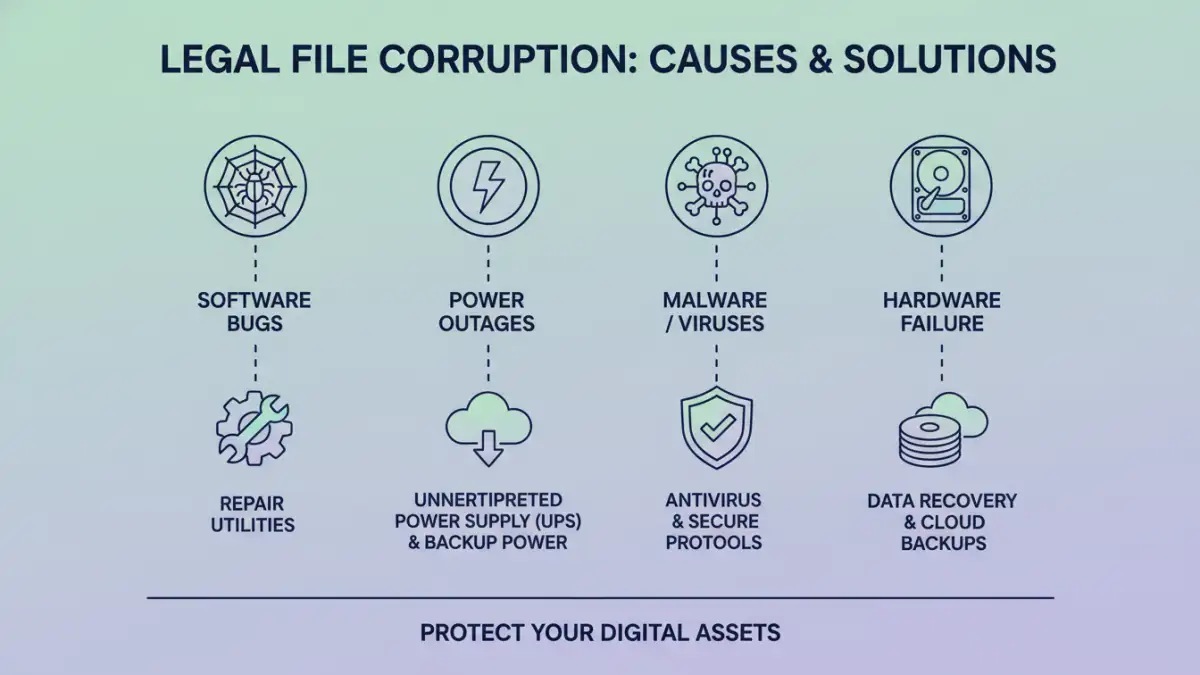
Several factors can lead to document corruption. Software glitches during saving or editing, unexpected power outages, or abrupt system shutdowns are frequent culprits. Inadequate storage media, such as failing hard drives or corrupted USB drives, can also damage files over time. Furthermore, malware or viruses can intentionally corrupt or encrypt files, posing a significant threat to data security.
Effective Recovery Strategies
When faced with a corrupted legal document, the first step is often to remain calm and avoid making hasty changes that could worsen the problem. Depending on the nature and extent of the corruption, several approaches can be employed for legal file restoration.
Utilizing Built-in Software Features
Many applications, like Microsoft Word or Adobe Acrobat, have built-in recovery features. For example, Word has an 'Open and Repair' option that can sometimes fix minor corruption issues. Similarly, checking previous versions or autosaved copies within the software can often provide a viable, uncorrupted version of the document.
Employing Specialized Recovery Tools
For more severe cases, dedicated corrupted document recovery software can be invaluable. These tools are designed to scan damaged files, identify the underlying issues, and attempt to reconstruct the data. I've found that selecting a reputable tool that supports the specific file format (e.g., .docx, .pdf) is crucial for a successful outcome. These tools often employ advanced algorithms to piece together fragmented data, aiming for document integrity recovery.
Seeking Professional Data Recovery Services
In critical situations where the data is irreplaceable and other methods fail, professional data recovery services offer a higher chance of success. These services have specialized hardware and expertise to handle complex damage, including physical damage to storage media. While more expensive, they are often the last resort for critical case file rescue.
Preventative Measures
The best approach to dealing with corrupted documents is to prevent them from occurring in the first place. Regular backups are non-negotiable. Implementing a robust backup strategy, including both local and cloud-based solutions, ensures that you always have a clean copy of your important legal files. Keeping software updated also helps mitigate risks associated with bugs. Additionally, using reliable hardware and performing regular disk checks can prevent storage-related corruption.
Case Study Example
A colleague recently faced a crisis when a crucial deposition transcript, a large PDF file, became inaccessible just days before a hearing. The file showed an error message indicating it was corrupted. After trying the standard 'Open and Repair' function in Adobe Reader with no success, we turned to a specialized PDF recovery tool. The software scanned the damaged file, identified several structural errors, and managed to reconstruct approximately 95% of the document. While a few pages required minor manual reformatting, the bulk of the transcript was saved, preventing a significant setback for the case.
Comparison Table: Document Recovery Approaches
| Method | Pros | Cons | Best For |
|---|---|---|---|
| Built-in Software Features | Free, readily available | Limited effectiveness for severe corruption | Minor glitches, recent saves |
| Specialized Recovery Software | Higher success rate for various corruption types | Can be costly, requires installation | Moderate to severe corruption, specific file types |
| Professional Data Recovery Services | Highest chance of success, handles physical damage | Most expensive option, time-consuming | Irreplaceable data, severe physical or logical damage |