
When safeguarding sensitive information, relying solely on standard password protection or basic file encryption often falls short. The digital landscape is constantly evolving, and with it, the sophistication of threats against our data. I've seen firsthand how critical it is to implement more robust measures, especially for businesses and individuals dealing with proprietary information, client data, or intellectual property.
This need for deeper security has led to the development and widespread adoption of Digital Rights Management (DRM) technologies. While the term DRM might sound complex, its core purpose is straightforward: to control how digital content is accessed and used. Moving beyond simple locks, advanced DRM features offer granular control, ensuring that your documents are not just protected from unauthorized access but also managed throughout their lifecycle.
Table of Contents
Understanding Advanced DRM
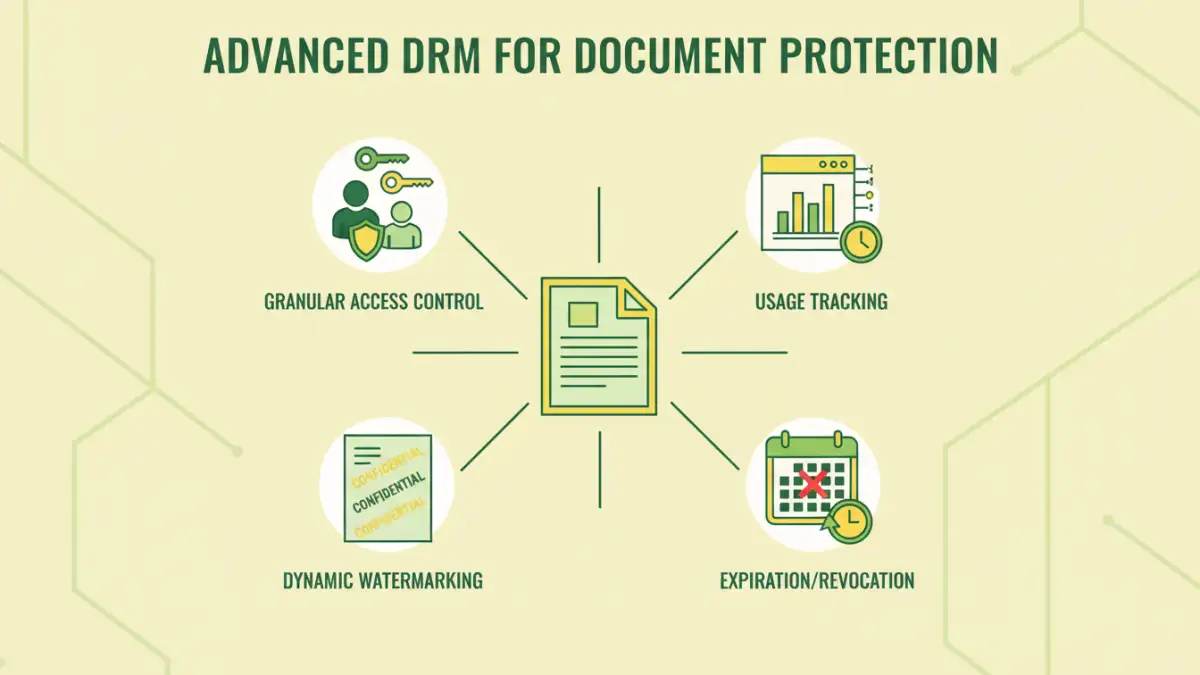
At its heart, advanced DRM builds upon foundational security principles but introduces layers of control that are dynamic and context-aware. Unlike static passwords that are either on or off, DRM systems can define specific permissions for different users or groups, and even for the same document over time. This level of sophistication is crucial for managing intellectual property and confidential data effectively.
Key Concepts in Advanced DRM
The core of advanced DRM lies in its ability to enforce policies beyond simple authentication. This includes defining who can view, print, copy, or even edit a document. These policies are often tied to user identity, device, location, or even the time of day, offering a multi-faceted approach to document protection.
Granular Access Control
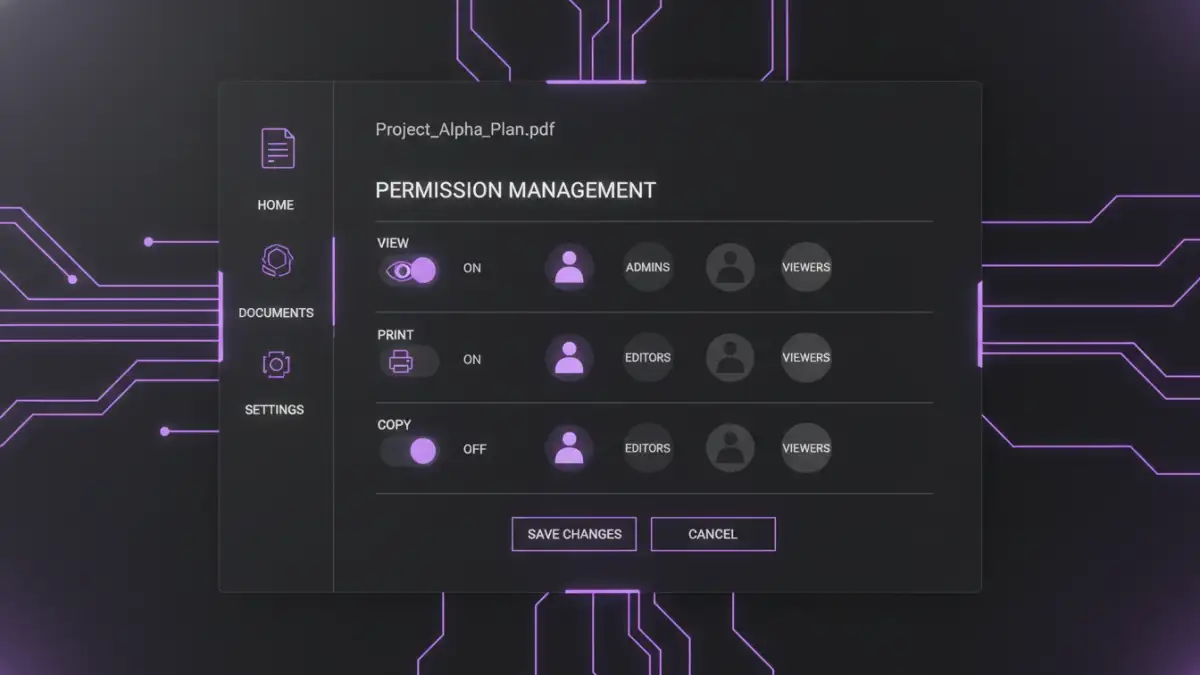
One of the most powerful aspects of advanced DRM is its capability for granular access control. This means you can specify exactly what actions a user can perform with a document. For instance, you might allow a sales team to view a proposal but prevent them from printing or copying its contents.
I've implemented systems where external partners could only view a document for a limited time, and only on a specific, authorized device. This prevents accidental or intentional leakage of sensitive information, which is a significant concern in collaborative environments. This level of fine-tuned control is a significant step up from basic password protection.
Usage Tracking and Auditing
Knowing who accessed your documents, when, and how is invaluable for security and compliance. Advanced DRM features provide detailed audit trails. This allows you to monitor document activity, identify suspicious patterns, and ensure that usage policies are being adhered to.
For example, if a document is suspected of being leaked, the audit log can pinpoint the exact user and time of access, helping to quickly contain the breach. This visibility is a critical component of any comprehensive document protection strategy.
Dynamic Watermarking
Static watermarks are easily removed. Advanced DRM systems, however, can apply dynamic watermarks that are embedded directly into the document's content or metadata. These watermarks can include user-specific information, such as the viewer's name, email address, or the date and time of access.
If a document with a dynamic watermark is shared illicitly, the watermark serves as a clear indicator of its origin, deterring unauthorized distribution. This is a powerful deterrent and a crucial tool for identifying the source of leaks.
Content Expiration and Revocation
Information can become outdated or sensitive situations can change, necessitating the removal of access. Advanced DRM allows you to set expiration dates for document access. Furthermore, you can revoke access to documents remotely, even after they have been downloaded or shared.
This is particularly useful for contracts, proposals, or sensitive project plans that have a limited validity period. Being able to remotely disable access provides a critical safety net against data exposure.
Integration with Existing Workflows
The most effective security solutions are those that integrate seamlessly into existing workflows. Advanced DRM systems can often be integrated with enterprise content management (ECM) systems, cloud storage platforms, and other business applications. This ensures that protection is applied automatically as documents are created or stored.
When I've helped organizations implement these solutions, the key to success was minimizing disruption. Integrating DRM into familiar tools means users can continue working efficiently while benefiting from enhanced security, which promotes adoption and compliance.
Implementing Advanced Document Protection
Implementing advanced DRM involves selecting the right tools and policies for your specific needs. It’s not just about technology; it’s about understanding your data, your users, and your threat model. Careful planning and policy definition are as important as the technological implementation itself.
Consider the types of documents you need to protect, who needs access, and what level of control is necessary. Often, a phased approach, starting with the most sensitive data, can be highly effective. The goal is to create a secure environment without hindering productivity.
Comparison Table: Document Protection Methods
| Method | Key Features | Pros | Cons | Ideal Use Case |
|---|---|---|---|---|
| Basic Password Protection | Password to open file | Simple, widely supported | Weak security, easily bypassed, no granular control | Personal, non-critical files |
| File Encryption (e.g., AES) | Strong cryptographic algorithms | High level of confidentiality, difficult to break | Requires key management, no usage control after decryption | Sensitive data at rest |
| Advanced DRM | Granular access control, watermarking, usage tracking, expiration, revocation | Comprehensive control, auditability, policy enforcement, data lifecycle management | Can be complex, requires dedicated software/services, potential compatibility issues | Intellectual property, confidential business data, compliance-driven environments |
| Cloud Access Controls | Permissions based on user/group within cloud platform | Easy to manage for cloud-stored files, integration with cloud services | Limited to files within the cloud platform, less control over downloaded copies | Collaborative documents in cloud environments |
Choosing the right method depends on the sensitivity of your data and the required level of control. For robust document protection, especially for sensitive business information, advanced DRM features offer unparalleled capabilities.