It's a situation I've seen play out multiple times in corporate environments: you inherit a critical Word document—a .docm file with years of complex macro development—but the VBA project is locked. The original developer has left the company, and nobody knows the password. You're stuck, unable to debug, update, or even view the code that drives essential business processes.
While VBA project protection is a useful feature, losing the password can feel like hitting a brick wall. Fortunately, for many older Word file formats, there's a technical workaround that involves directly editing the file's binary data. This method requires care and precision, but it can be a lifesaver when you're out of options.
Table of Contents
Understanding VBA Protection in Word
Before we dive into the solution, it's helpful to understand what we're dealing with. When you password-protect a VBA project in a Word document, you're not encrypting the code in a cryptographically secure way, especially in older file formats. Instead, Word adds a flag or a key within the file's structure that tells the Visual Basic Editor (VBE) not to display the code without the correct password.
Our goal is to find this specific flag within the file's binary code and change it. By modifying this key, we can trick Word into thinking there is no password, allowing the VBE to open the project freely. This is why the method works—it's less about 'cracking' a password and more about flipping a switch from 'locked' to 'unlocked'.
Why This Isn't Hacking a Password
It's important to differentiate this technique from brute-force password cracking. We are not attempting to guess the password. Instead, we are performing a direct manipulation of the file's internal structure. This is akin to a locksmith picking a lock rather than trying every possible key. It's a precise modification based on a known vulnerability in how the protection was implemented.
The Hex Editor Method: Step-by-Step Guide

This process requires a tool called a hex editor, which allows you to view and edit the raw binary data of a file. There are many free options available, such as HxD, Frhed, or Hex Fiend for macOS. Once you have one installed, you can proceed.
Disclaimer: This method involves directly editing a file's binary code. An incorrect change can easily corrupt your file, making it unusable. Always work on a backup copy.
Step-by-Step Instructions
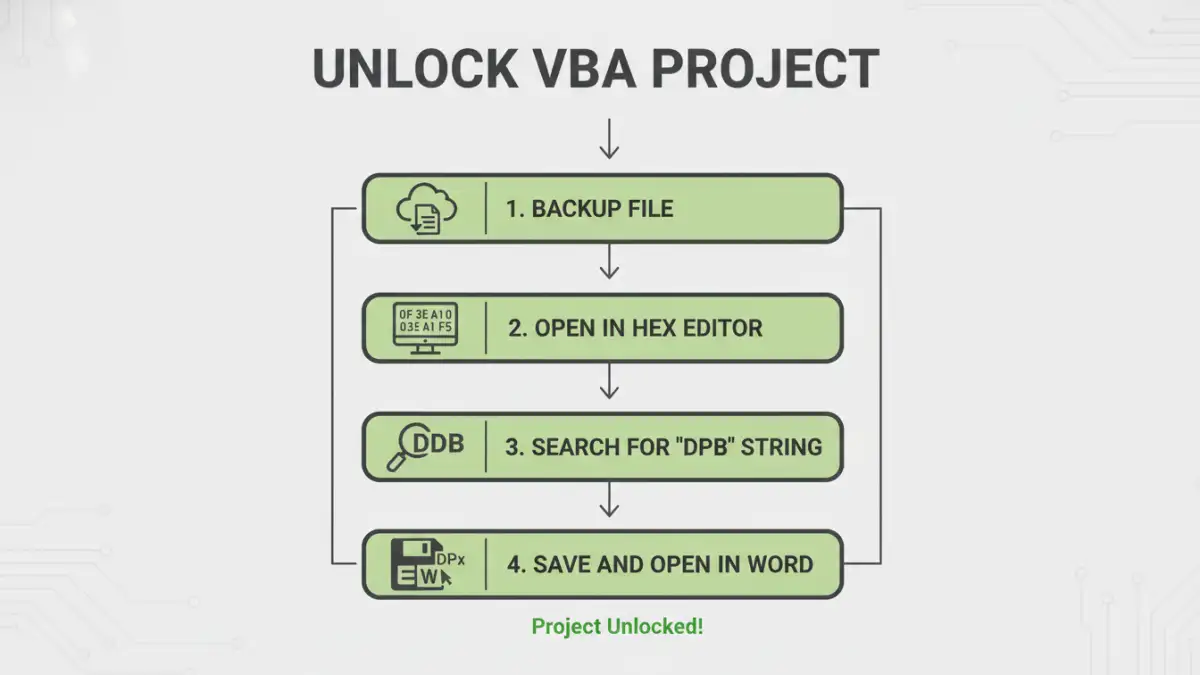
- Create a Backup: This is the most crucial step. Before you do anything else, make a copy of your .docm file. If something goes wrong, you can always revert to the original. Never work on your only copy.
- Open the File in a Hex Editor: Launch your hex editor and open the backup copy of the Word document. You will be presented with a screen full of hexadecimal characters (0-9 and A-F). It may look intimidating, but we are only looking for a specific sequence.
- Search for the DPB String: Most hex editors have a search or 'Find' function (usually Ctrl+F). You need to search for the text string
DPB. This string is part of the key that Word uses to identify a password-protected VBA project. - Modify the String: Once the search finds the
DPBstring, carefully replace it withDPx. You only need to change the 'B' to an 'x'. Be very careful not to add or delete any other characters, as this will shift the file's byte structure and corrupt it. - Save and Close: Save the changes in the hex editor and close the application.
- Open the Document in Word: Now, open the modified .docm file in Microsoft Word. You may get a warning or an error message when you first open it. This is often expected because we've made an 'invalid' change that Word's error-checking might flag. Click 'Yes' or 'OK' to proceed with opening the file.
- Access the VBA Project: Press Alt+F11 to open the Visual Basic Editor. The project should now be accessible. The final step is to reset the password. In the VBE, go to Tools > Project Properties > Protection tab. You can now set a new password (or leave it blank) and save the document. This will fix the error message you saw earlier and properly secure (or un-secure) the project.
I once used this exact method to recover a complex automation tool for a finance department. The document was over a decade old, and the original creator was unreachable. By carefully modifying the DPB key, we were able to access and update the macros, saving the team weeks of redevelopment work. It's a powerful technique when used responsibly.
Risks and Legal Considerations
While effective, this method isn't without its risks. The primary technical risk is file corruption. A single wrong byte can render the document, or at least its macros, completely useless. This is why the backup step is non-negotiable.
From an ethical and legal standpoint, you should only perform this procedure on documents that you have the legal right to access and modify. Using this technique to access a VBA project locked word document for which you don't have authorization could have serious consequences. Always ensure you are acting within your organization's policies and have the proper permissions before proceeding.
Prevention and Best Practices for the Future
Dealing with a lost word document vba password is a reactive measure. A better long-term strategy is to prevent the situation from happening in the first place. For any development work, including VBA projects, proper documentation and password management are key.
I always recommend using a secure password manager for teams. Tools like 1Password or Bitwarden allow you to store credentials for projects securely and share them with authorized team members. When a developer leaves, the password isn't lost with them. Documenting the password in a secure, central location is a simple step that can prevent major headaches down the road.
Method Comparison: Unlocking VBA Projects
| Method | Complexity | Risk of Corruption | Cost | Best For |
|---|---|---|---|---|
| Hex Editor Method | Medium | High (if done incorrectly) | Free | Users comfortable with technical file editing when no other options exist. |
| Third-Party Software | Low | Low to Medium | Varies (Free to Paid) | Users who prefer an automated solution and are willing to trust external software. |
| Password Guessing | Low | None | Free | Situations where the password might be simple or follow a known pattern. |
| Contacting Original Author | Very Low | None | Free | The ideal first step if the original developer is reachable and cooperative. |