
Working with password-protected documents can be frustrating, especially when you genuinely need to access the information but can't recall the password. This is a common scenario, whether it's a file you created long ago or one shared with you by someone else. OpenDocument files, commonly known by their .odt extension for text documents, are no exception. Fortunately, there are several approaches you can consider to regain access.
My experience in software engineering has shown me that while strong encryption is vital for security, it can sometimes become a barrier for legitimate users. This guide aims to provide a clear path for those needing to access password protected OpenDocument files, balancing security with practical solutions.
Table of Contents
Understanding OpenDocument Security
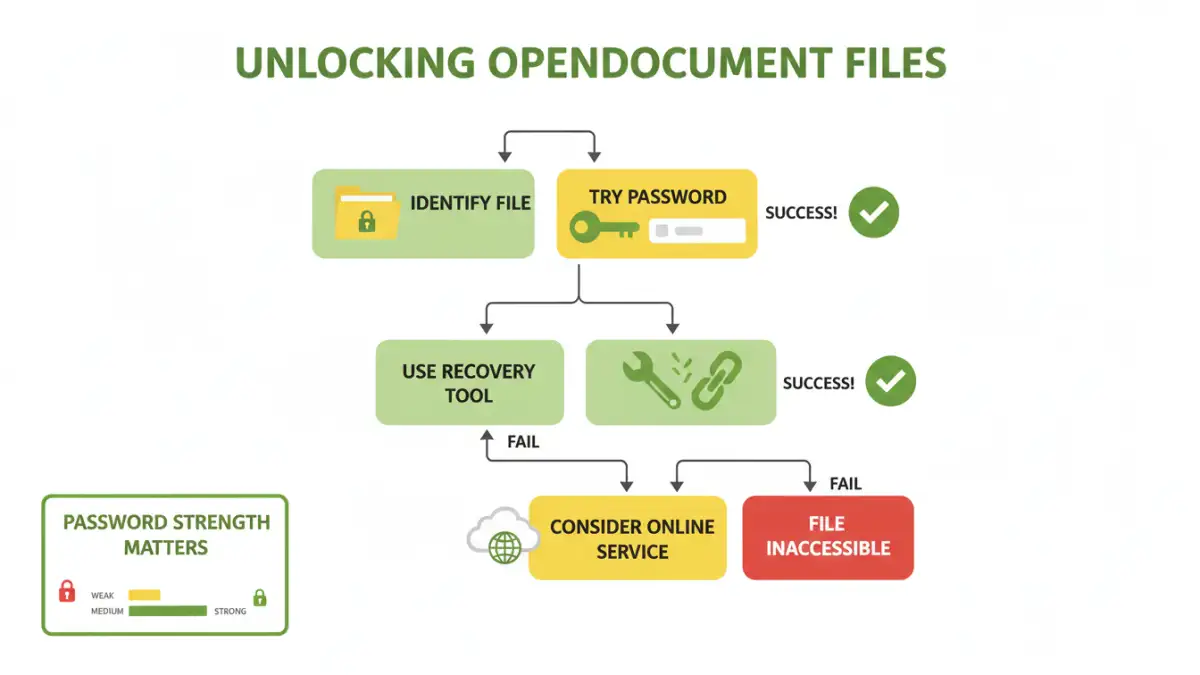
OpenDocument files, particularly those created with LibreOffice or Apache OpenOffice, can be protected with passwords to prevent unauthorized access. This protection typically involves encrypting the document's content. The strength of this encryption can vary, but modern implementations generally use robust algorithms.
Encryption Levels and Password Strength
The effectiveness of the password protection relies heavily on the encryption algorithm used and the complexity of the password itself. While some older versions might have used weaker encryption, newer versions often employ AES-256, which is highly secure. This means that brute-forcing a strong password can be computationally infeasible.
Common Methods to Access Files

When faced with a password-protected ODT file, the first and most straightforward approach is to try recovering the password through legitimate means. If you are the original creator or have a legitimate reason to access the file, these methods are your best bet.
Method One: Using Password Recovery Tools
There are specialized software tools designed to attempt password recovery for various file types, including OpenDocument. These tools often employ brute-force or dictionary attacks to guess the password. The success rate depends heavily on the password's complexity and the tool's capabilities. Some tools are free, while others are commercial. It's crucial to use reputable software to avoid malware.
Method Two: Online Document Decryption Services
Similar to desktop software, several online services claim to help unlock password-protected files. You upload your file, and their servers attempt to decrypt it. While convenient, these services come with significant privacy risks. You are entrusting sensitive data to a third party, and there's no guarantee of its security or deletion after processing. Use these with extreme caution, especially for confidential documents.
Method Three: The Browser Trick (Limited Usefulness)
For certain older versions or specific types of password protection in OpenDocument files (particularly those that only encrypt metadata or are password protected for opening but not editing in some contexts), a workaround might exist. This involves renaming the file extension to a ZIP archive (.zip) and then extracting its contents. If the password protection is weak, some unencrypted parts or hints might be accessible. However, for strong encryption, this method will likely fail to extract usable data.
Advanced Techniques and Considerations
Beyond the common methods, some more advanced or less common approaches might be considered, though they often require technical expertise or carry their own risks. Understanding the limitations of each method is key.
Brute-Force and Dictionary Attacks Explained
These are the primary techniques used by recovery tools. A brute-force attack tries every possible combination of characters until the password is found. A dictionary attack uses a list of common words, phrases, and character combinations. Both can take an extremely long time, potentially days, weeks, or even years, depending on password length and complexity, and the processing power available. For strong passwords, these attacks are often impractical.
When to Seek Professional Help
If the document is critically important and you've exhausted all other options, consider professional data recovery services. These specialists have advanced tools and techniques, but their services can be expensive. Ensure you vet any service thoroughly before handing over your data.
Best Practices for Document Security
Preventing the need to unlock a password protected OpenDocument file in the first place is always the best strategy. Implementing strong security habits can save you a lot of trouble down the line.
Creating Strong, Memorable Passwords
The most effective passwords are long, complex, and unique. Consider using a passphrase—a sequence of words—that is easy for you to remember but difficult for others to guess. A password manager can be invaluable for generating and storing such complex passwords securely.
Regular Backups
Maintain regular backups of your important files. If you lose access to an encrypted document, a backup might provide an older, perhaps unencrypted or differently encrypted, version. Ensure your backups are also stored securely.
Comparison Table
| Method | Pros | Cons | Success Rate (Strong Passwords) |
|---|---|---|---|
| Password Recovery Tools (Desktop) | Can be powerful, more control over attack parameters | Requires installation, can be costly, may take a long time | Low to Moderate |
| Online Decryption Services | Convenient, no installation needed | Significant privacy/security risks, limited functionality | Low to Moderate |
| ZIP Archive Renaming | Free, quick to try | Rarely effective for strong encryption | Very Low |
| Professional Services | Highest chance of success for critical data | Very expensive, requires trust | High (but not guaranteed) |