Working with password-protected documents can be frustrating, especially when you need to access critical information or convert files but have forgotten the password, or the password was set by someone else. Over my years in software engineering, I've encountered numerous situations where accessing these encrypted archives was essential, whether for data recovery, migrating old projects, or simply organizing files. It's a common problem, and thankfully, there are effective and safe ways to tackle it without compromising your data.
The key is understanding the different types of protection and the methods available. Not all password protection is created equal, and the approach you take will depend on the archive format, the encryption strength, and your specific needs. This guide will walk you through how to approach these challenges, ensuring you can regain access to your files securely and efficiently.
Table of Contents
Understanding Archive Protection
Archive files, such as ZIP, RAR, or 7z, are common for bundling multiple files into a single unit. When password protection is applied, it typically involves encrypting the contents of the archive. The strength of this protection varies significantly based on the encryption algorithm used (like AES-256 or older ZipCrypto) and the complexity of the password itself.
Encryption Algorithms and Password Strength
Modern encryption algorithms are very robust, making brute-force attacks extremely time-consuming, if not impossible, without the correct password. Older or weaker encryption methods, however, might be more susceptible to recovery tools. The password's length, character set, and predictability play a crucial role in its security. A strong, unique password is the best defense, but it can also be the biggest hurdle when forgotten.
Methods to Unlock Archive Files
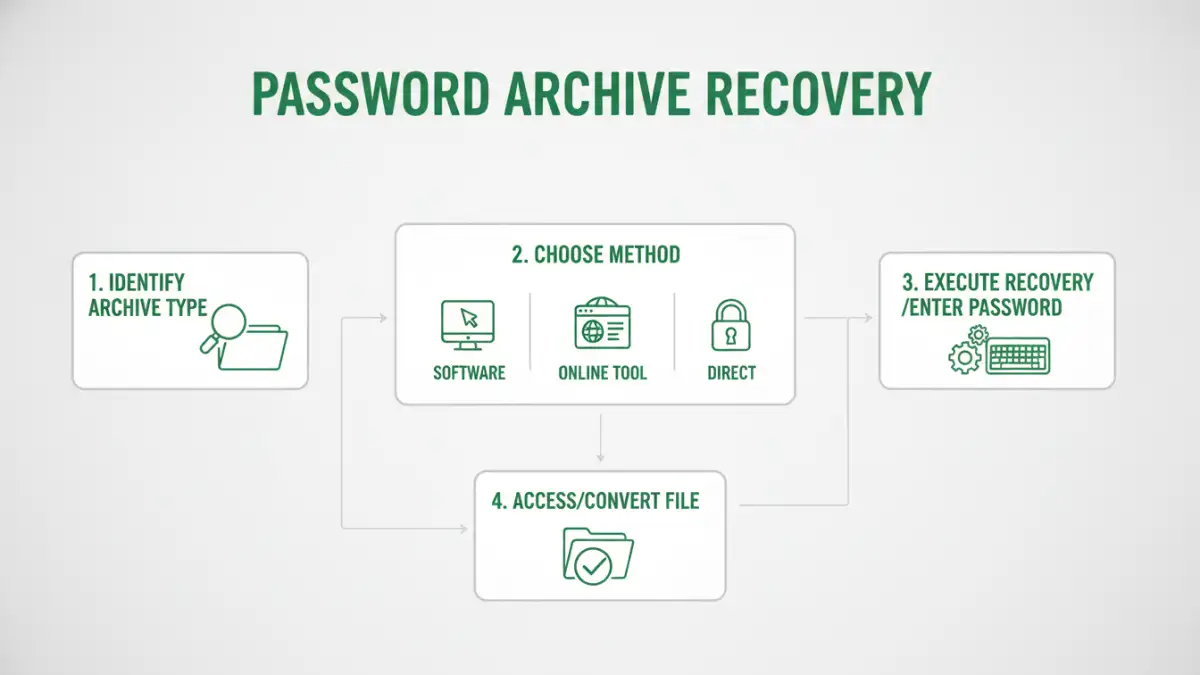
When you need to unlock archive files, the first step is to consider the context. If you know the password but can't recall it, password recovery tools might be an option. If the archive was encrypted by someone else and you have their permission, obtaining the password directly is the simplest route. For situations where the password is lost and direct recovery isn't feasible, specialized software comes into play.
Password Recovery Tools
There are various software solutions designed for password archive recovery. These tools typically employ techniques like brute-force attacks (trying every possible combination of characters), dictionary attacks (using lists of common words and phrases), or mask attacks (where you provide hints about the password's structure). My experience with these tools has shown they can be effective, but they require patience, computational power, and often a license fee. It's crucial to use reputable software to avoid malware.
Leveraging Online Services (with Caution)
Some online services claim to help unlock password-protected archives. While convenient for simple cases or older encryption types, these services often come with significant privacy risks. You're uploading your sensitive data to a third party, and there's no guarantee of its security or that the service provider won't misuse it. I generally advise caution and recommend using desktop software for sensitive files.
Secure File Conversion
Once you've successfully accessed your archive, you might need to convert the files within to a different format or extract them. Secure file conversion is essential to maintain the integrity and confidentiality of your data. If you had to use a recovery tool, ensure the extraction process is also secure, especially if the original archive contained sensitive information.
Extraction and Format Changes
Most archive utilities (like 7-Zip, WinRAR, or built-in OS tools) allow you to extract files once the password is provided or recovered. If you need to convert files, standard conversion tools or even built-in application features (like 'Save As' in Microsoft Office) can be used. Always ensure you are using trusted software for any conversion process to prevent data corruption or security breaches.
Best Practices for Security
To avoid future issues with locked files and to maintain good data hygiene, adopting best practices is vital. This includes strong password management, understanding the encryption methods you use, and regularly backing up important data.
Password Management and Encryption Choices
Using a reputable password manager is one of the most effective ways to create and store strong, unique passwords for all your archives and accounts. When encrypting files yourself, opt for strong encryption algorithms like AES-256. Avoid legacy encryption methods when possible. Documenting or securely storing the passwords for critical archives can also prevent significant headaches down the line.
Comparison Table: Archive Access Methods
| Method | Pros | Cons | Best For |
|---|---|---|---|
| Password Recovery Software | Can recover forgotten passwords, supports various archive types. | Can be time-consuming, requires computational resources, potential cost, risk of malware if not reputable. | Recovering access to your own lost passwords on archives with older/weaker encryption. |
| Online Unlocking Services | Convenient, no software installation needed, often free for basic use. | Significant privacy and security risks, limited file size/type support, may not handle strong encryption. | Quickly accessing non-sensitive files where privacy is not a primary concern. |
| Direct Password Retrieval | Fastest and most secure method, no recovery tools needed. | Requires knowing or obtaining the correct password. | When the password is known or can be easily obtained from the source. |