I recently helped a colleague who was struggling with a mountain of password-protected documents. Some were PDFs with one password, others were Excel sheets with a different set of rules, and a few Word files had yet another. The sheer inconsistency wasn't just a headache; it was a significant security vulnerability. This common scenario highlights a critical challenge many organizations face: how do you maintain consistent security when every document type seems to demand its own unique protection method?
Table of Contents
The Inconsistency Problem in Document Security
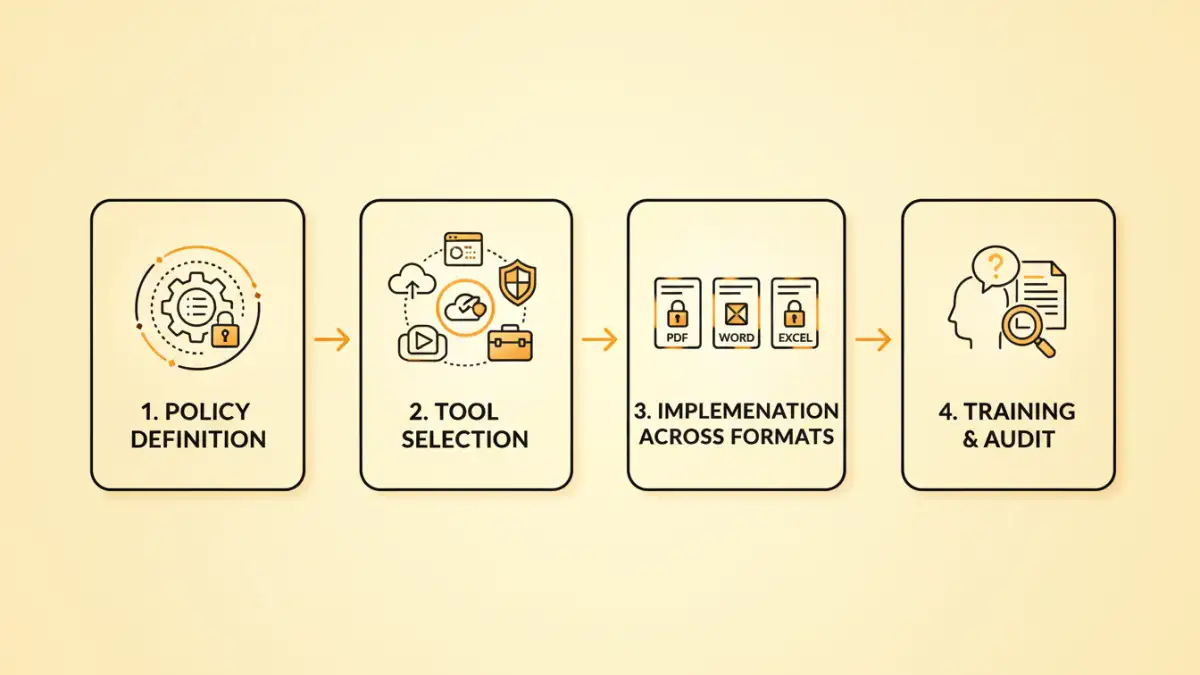
Working with various document types means grappling with their native security features, which are often disparate. A PDF's password protection might be robust, but an older Word document's encryption could be significantly weaker. This fragmentation creates gaps in your overall security posture and makes managing access rights incredibly complex.
The Risks of Disparate Protection
When document security policies aren't unified, you run the risk of human error leading to breaches. Employees might use simple passwords for one file type and complex ones for another, or forget which policy applies where. This lack of a cohesive strategy for cross format password management can lead to unauthorized access, data leaks, and compliance failures.
Core Principles of Unified Password Policies

Establishing unified document password policies isn't just about setting a strong password for everything; it's about creating a consistent framework. This framework ensures that regardless of whether you're securing a sensitive contract in PDF, financial data in Excel, or a confidential report in Word, the underlying security principles remain the same.
Key Components of a Robust Policy
A strong policy typically dictates minimum password length, complexity requirements (mix of uppercase, lowercase, numbers, special characters), and expiry periods. Beyond that, it should address multi-factor authentication (MFA) where feasible, and protocols for password recovery or resets. The goal is to elevate the security baseline for all sensitive information, regardless of its container.
Implementing Unified Policies Across Different Formats
Putting unified document password policies into practice requires understanding the capabilities of each document type and leveraging the right tools. From my experience over the years, a multi-pronged approach usually yields the best results, combining native features with dedicated security solutions.
Microsoft Office Documents (Word, Excel, PowerPoint)
Microsoft Office applications offer built-in encryption. You can access this through 'File > Info > Protect Document/Workbook/Presentation > Encrypt with Password'. It's crucial to enforce strong passwords here, as older Office versions had weaker encryption. For shared documents, consider using 'Restrict Editing' options alongside password protection to control what users can do.
PDF Documents
PDFs are widely used for sharing final documents, and their security features are quite robust. Tools like Adobe Acrobat Pro or other professional PDF editors allow you to set open passwords (to view the document) and permission passwords (to restrict printing, editing, or copying). Implementing multi format encryption for PDFs means ensuring these passwords meet your organizational standards for strength and complexity.
Archived Files (ZIP, RAR)
When compressing multiple files into a ZIP or RAR archive for secure transfer, you can typically add password protection directly within the archiving software (e.g., WinRAR, 7-Zip). These tools often support strong encryption algorithms like AES-256. This is an excellent method for securing collections of diverse files under a single, strong password policy.
Tools and Technologies for Enforcement
While native document features are a start, truly enforcing document security policies often requires dedicated tools. These solutions help automate policy application, manage keys, and provide centralized oversight, drastically improving your cross format password management.
Document Management Systems (DMS) and Enterprise Content Management (ECM)
Modern DMS and ECM platforms are designed to manage the lifecycle of documents, including their security. They can enforce access controls, encryption, and password policies automatically upon document creation or upload. These systems are invaluable for maintaining consistent document security policies across an entire organization, ensuring that sensitive data is always protected according to set standards.
Password Managers and Centralized Key Management
For individual users or smaller teams, enterprise password managers can play a role. While they primarily manage login credentials, some can securely store and generate strong passwords for documents. For more advanced scenarios, centralized key management systems can help manage encryption keys for large volumes of encrypted documents, providing an additional layer of control and simplifying key rotation.
Best Practices for Sustainable Security
Implementing unified document password policies is an ongoing effort, not a one-time setup. Continual vigilance and adaptation are key to maintaining a strong security posture in the face of evolving threats.
- Regular Audits and Reviews: Periodically review your document security policies and practices. Are they still effective? Are there new vulnerabilities to address?
- User Training: The strongest policies are useless if users don't understand or follow them. Regular training on why and how to apply these policies is crucial.
- Incident Response Planning: Have a clear plan for what to do if a password-protected document is compromised or if a key is lost.
- Leverage Automation: Automate password enforcement and encryption where possible, especially within DMS or ECM systems, to reduce human error.
- Maintain Strong Password Hygiene: Encourage the use of unique, complex passwords for all protected documents, and avoid reusing passwords across different systems or files.
Document Password Management Approaches Comparison
| Method | Pros | Cons | Best For |
|---|---|---|---|
| Native Document Features (e.g., Office, PDF) | Built-in, no extra software needed, generally easy to use | Varying strength across formats, decentralized management, depends on user adherence | Individual files, small teams, basic protection needs |
| Archiving Software (e.g., 7-Zip, WinRAR) | Strong encryption (e.g., AES-256), consolidates multiple files, widely available | Requires software installation, individual archives, not for real-time document access | Secure file transfer, batch encryption of diverse files |
| Document Management Systems (DMS/ECM) | Centralized policy enforcement, automated encryption, access control, versioning | Significant investment, complex implementation, requires organizational buy-in | Enterprise-level document lifecycle management, compliance, large organizations |
| Third-Party Encryption Tools | Often more robust and flexible than native, consistent interface across files | Additional software cost, potential compatibility issues, requires user training | Specific high-security needs, specialized file types, cross-platform consistency |