
Accessing password-protected files programmatically can be a significant hurdle in automating workflows. Whether you're dealing with sensitive reports, encrypted archives, or secure data transfers, manually entering passwords is time-consuming and prone to errors. Fortunately, with the right approach, you can leverage APIs to handle this process efficiently.
Over my years in software engineering, I've encountered numerous scenarios where automating access to protected files was crucial for operational efficiency. This often involves integrating with systems that rely on encrypted documents or archives. The challenge lies in securely and reliably providing the necessary credentials without compromising the data's integrity or exposing sensitive information.
Table of Contents
Understanding the Basics
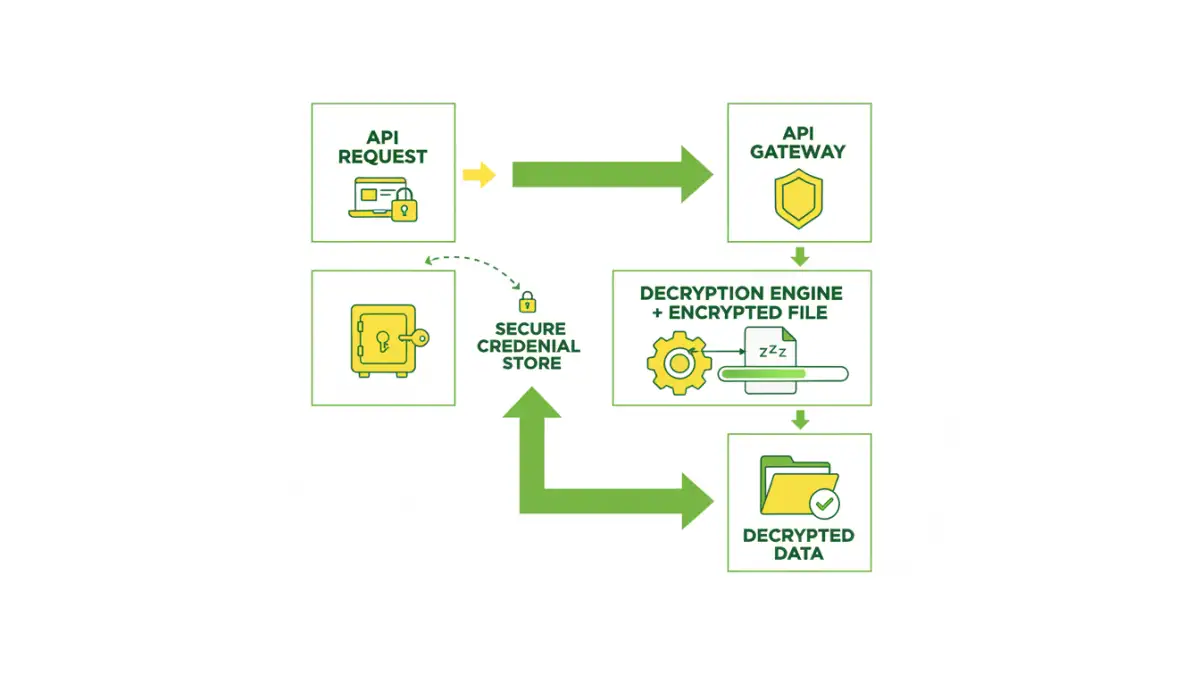
At its core, accessing a password-protected file programmatically means providing the correct password or decryption key to a system or script that can then unlock and process the file. This is distinct from manual access where a user interactively enters credentials. Automation requires a method to supply these credentials securely and in a format the system understands.
Key Concepts in File Protection
Files can be protected in several ways, most commonly through encryption. This involves an algorithm that scrambles the file's data, making it unreadable without a specific key or password. Understanding the type of encryption used (e.g., AES, ZIP encryption, PDF encryption) is crucial for choosing the right automated approach. The goal is to find a way to interface with these protection mechanisms via an API.
Methods for Automated Access

Several methods exist for automating access to protected files, ranging from simple command-line tools to sophisticated libraries. The choice often depends on the file type, the operating system, and the programming language you are using. Each method has its own set of advantages and disadvantages, particularly concerning security and ease of implementation.
Leveraging Libraries and SDKs
Many programming languages offer libraries that can handle common file formats and their associated protection schemes. For example, libraries exist for Python (like PyPDF2 for PDFs, or zipfile for ZIP archives) that allow you to specify a password when opening or decrypting files. These libraries abstract away the complexities of encryption algorithms, providing a straightforward interface for developers.
Using Command-Line Utilities
For certain file types, command-line utilities can be invoked from a script. Tools like `unzip` with a `-P` flag for password-protected ZIP files, or specific PDF manipulation tools that accept password arguments, can be integrated into automated workflows. This approach is particularly useful in shell scripting or when working within environments where installing complex libraries is not feasible.
API Integration Strategies
When we talk about using an API for protected files, it generally falls into two categories: either the API is part of a service that handles file decryption for you, or you are building an API endpoint that orchestrates the decryption process using underlying libraries or tools. The former is simpler if a suitable service exists; the latter offers more control.
Building Your Own API Endpoint
You might create a microservice that exposes an API endpoint. When a request comes in with a file and its associated credentials (handled securely, of course), the service uses a library to decrypt the file and then performs the necessary action. This encapsulates the logic and makes it callable by other applications. This is where a robust password protected file api can be built internally.
Utilizing Third-Party Services
Several cloud-based services offer APIs for document processing, including decryption. These services often handle the complexities of various encryption standards. You would typically upload the encrypted file, provide the password via the API call, and receive the decrypted content or a processed version back. This offloads the decryption burden and can be very efficient.
Security Considerations
Automating access to password-protected files inherently involves handling sensitive credentials. It's paramount to do this securely. Hardcoding passwords directly into scripts or API requests is a major security risk and should be avoided at all costs. Instead, use secure methods for credential management.
Secure Credential Management
Employ secrets management tools (like AWS Secrets Manager, HashiCorp Vault, or Azure Key Vault) to store passwords and API keys. Your application or API can then retrieve these credentials securely at runtime. Environment variables can also be a basic option for less sensitive environments, but dedicated secrets managers offer superior security features like rotation and access control.
Access Control and Auditing
Ensure that only authorized systems and users can access the API endpoint or the automated scripts. Implement robust authentication and authorization mechanisms. Furthermore, log all access attempts, successful or failed, for auditing purposes. This helps in detecting and responding to potential security breaches.
Best Practices for Automation
To ensure your automated file access remains efficient and secure, adhere to established best practices. This includes error handling, logging, and keeping your tools and libraries up-to-date.
Error Handling and Logging
Implement comprehensive error handling to gracefully manage situations where decryption fails (e.g., incorrect password, corrupted file). Detailed logging is essential for troubleshooting and monitoring the health of your automated processes. This helps in quickly identifying and resolving issues related to password protected file access.
Regular Updates and Testing
Keep all libraries, tools, and API integrations updated to patch security vulnerabilities and benefit from performance improvements. Regularly test your automated workflows with various scenarios, including edge cases and incorrect credentials, to ensure they function as expected and securely.
Comparison Table
| Method | Pros | Cons | Use Case |
|---|---|---|---|
| Programming Libraries (e.g., Python's PyPDF2) | High control, language integration, cost-effective | Requires coding knowledge, specific library for each file type | Custom applications, batch processing |
| Command-Line Utilities (e.g., unzip -P) | Simple to integrate in scripts, widely available | Limited file type support, less robust error handling | Shell scripting, basic automation tasks |
| Third-Party Cloud APIs | Easy integration, managed infrastructure, handles many formats | Potential privacy concerns, ongoing costs, reliance on external service | Quick integration for common file types, outsourcing decryption |
| Internal API Service | Full control over security and logic, customizable | Requires development effort, infrastructure management | Complex internal workflows, sensitive data requiring custom handling |