Many of us, especially those working with established systems or inherited projects, run into situations where we need to handle older database files. These files might contain crucial information, but accessing them can sometimes be a challenge, especially when security is a concern. My experience has shown that securing these legacy assets is just as important as protecting modern data, and often requires a slightly different approach.
The need to password protect database files, particularly those that may not have built-in modern encryption, is a common requirement. Whether it's for compliance, privacy, or simply controlling access to sensitive information, implementing a robust security layer is paramount. This guide will walk you through understanding the nuances of securing these older files and provide practical methods for achieving it.
Table of Contents
Understanding the Basics
When we talk about protecting older database files, we're often dealing with formats that predate some of the more sophisticated encryption standards we see today. The core principle remains the same: restricting unauthorized access. This usually involves either encrypting the file itself or implementing access controls at a higher level.
The challenge with legacy systems is that their native security features might be limited or outdated. This means we often need to rely on external tools or methods to achieve the desired level of database file security. Understanding the specific type of database file you're working with is the first crucial step.
Key Concepts in Legacy Data Security
Effective legacy database protection hinges on a few core ideas. First, identifying what constitutes 'sensitive' data within the file is critical. Second, understanding the limitations of the original file format helps in choosing the right protection method. Finally, ensuring that the chosen method doesn't corrupt the data or make it inaccessible to authorized users is paramount.
Common Database File Types and Their Security
Different database systems store their data in various file formats. For instance, older Microsoft Access databases (.mdb files) have some built-in password protection capabilities, though they are not considered cryptographically strong by modern standards. Similarly, older versions of dBase or FoxPro files might rely on file system permissions or external encryption.
Even simple flat files used for data storage, like CSVs or older text-based formats, need protection. While they don't have inherent database structures, they can still contain sensitive information that requires safeguarding. The approach to password protect database files will vary significantly based on the underlying technology.
Security Features of Older Formats
Many older database formats lack robust, built-in encryption options. They might offer basic password protection that can be easily bypassed with the right tools if the password is weak. This is where implementing external security measures becomes essential for true secure data access.
Methods to Protect Your Files
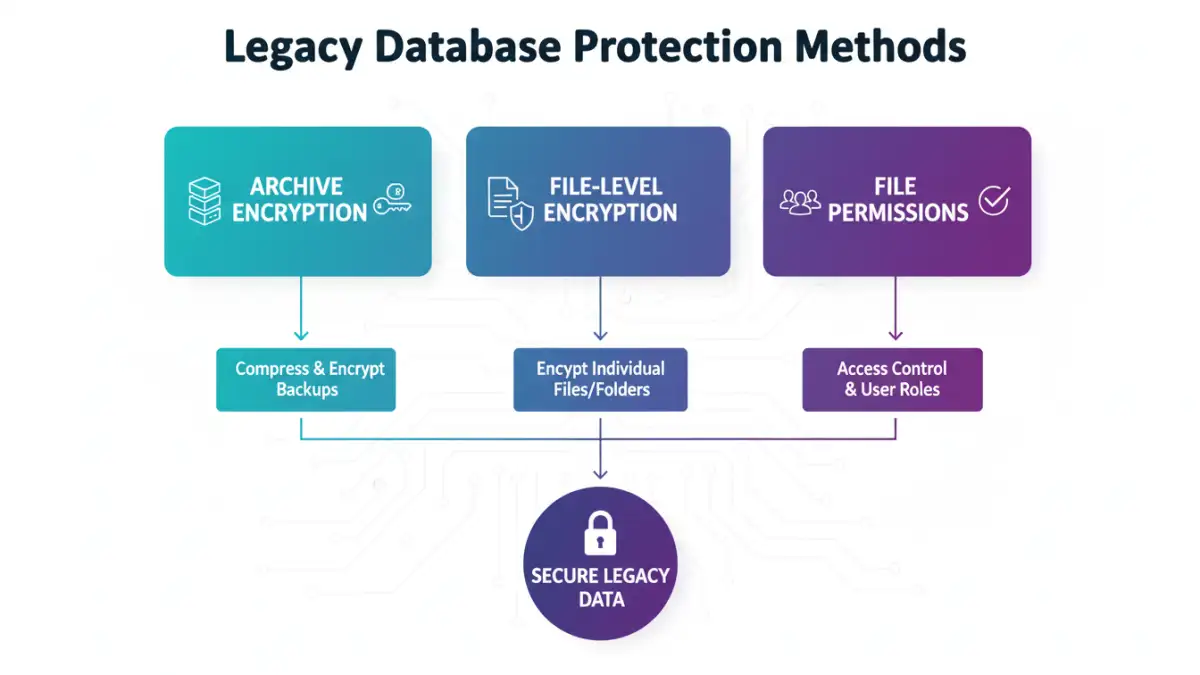
There are several ways to add a layer of protection. One common approach is to use file-level encryption tools. These tools can encrypt the entire database file, requiring a password to decrypt and access it. Software like VeraCrypt or BitLocker (on Windows) can create encrypted containers or encrypt entire drives, which can house your legacy database files.
Another method involves using archive utilities that offer encryption. Tools such as 7-Zip or WinRAR can compress your database files into an encrypted archive. This adds a password to the archive itself, preventing access to the files within without the correct password. This is a straightforward way to password protect database files that lack native security.
Using Archive Utilities for Encryption
Compressing your database file into a password-protected ZIP or RAR archive is a widely accessible method. When creating the archive, you select an encryption algorithm (like AES-256 for better security) and set a strong password. This ensures that even if the archive file is shared or accessed by an unauthorized party, the contents remain unreadable.
Leveraging File System Permissions
While not strictly password protection of the file itself, controlling access at the operating system level is a fundamental security practice. You can set specific read/write permissions for user accounts on your network or local machine. This limits who can even attempt to open the database file, adding another layer to secure data access.
Best Practices for Legacy Database Protection
When implementing security for older database files, it's essential to follow best practices. Always use strong, unique passwords that are difficult to guess and consider using a password manager to keep track of them. Avoid using easily decipherable information like names, dates, or common words.
Regularly back up your database files, and ensure these backups are also stored securely. If you're using external encryption tools, keep the decryption keys or passwords in a safe, separate location. This old database encryption strategy is vital for recovery and maintaining access for authorized personnel.
Password Strength and Management
A strong password is your first line of defense. For password protect database files, aim for a mix of uppercase and lowercase letters, numbers, and symbols. The longer the password, the more secure it is. Implementing a password management solution can help you generate and store complex passwords securely, avoiding reuse across different systems.
Regular Auditing and Updates
Periodically review who has access to your database files and the security measures in place. If you're using older software, ensure you're aware of any known vulnerabilities and apply patches or workarounds if available. For legacy database protection, vigilance is key to maintaining a secure environment.
Comparison Table: Database File Security Methods
| Method | Description | Pros | Cons | Best For |
|---|---|---|---|---|
| Archive Encryption (e.g., 7-Zip, WinRAR) | Compresses files into an encrypted archive with a password. | Widely available, easy to use, good for general file protection. | May add an extra step to access, relies on archive software. | Password protect database files that lack native encryption. |
| File-Level Encryption (e.g., VeraCrypt, BitLocker) | Encrypts the entire file or creates an encrypted container. | Strong encryption, protects the file content directly. | Can be complex to set up, requires decryption to use the file. | Highly sensitive legacy database protection. |
| Native Database Password (if available) | Uses the database software's built-in password feature. | Integrated, simple to apply for supported formats. | Often weak encryption, easily bypassed for older formats. | Basic security for supported older database files. |
| File System Permissions | Restricts access based on user accounts and OS-level settings. | OS-integrated, good for multi-user environments. | Doesn't encrypt the file content, only access control. | Layered security for shared systems. |