Working with password-protected documents can be frustrating, especially when you genuinely need access to important information. Over my years in software engineering, I've encountered numerous situations where encrypted files presented a hurdle, not just technically, but also legally. Understanding your rights and the boundaries involved is crucial to navigate these scenarios correctly and ethically.
This guide aims to shed light on the legal and ethical considerations when you find yourself needing to access a locked PDF file. We'll explore what constitutes legitimate access, the implications of unauthorized access, and your rights concerning documents you have a valid reason to view.
Table of Contents
Understanding the Basics
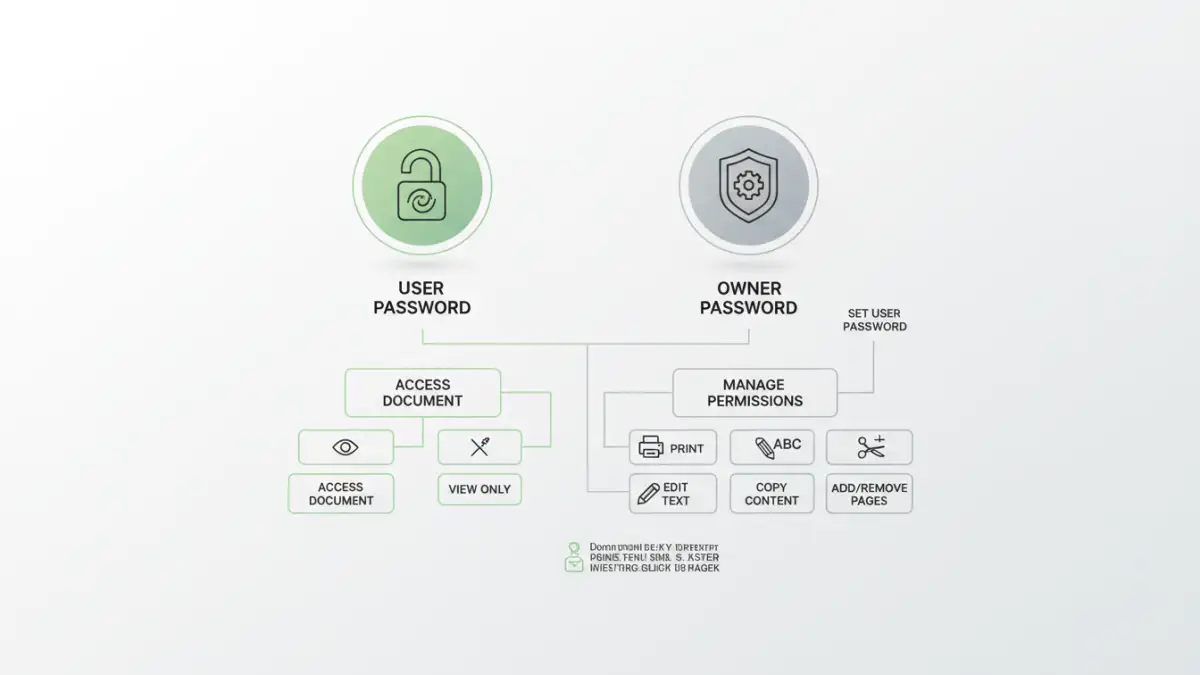
PDF files are commonly secured with passwords to protect sensitive information from unauthorized viewing, editing, or printing. These protections can range from simple user passwords that prevent opening the file to more complex owner passwords that restrict specific actions. It's vital to distinguish between these types of restrictions when considering access.
Types of PDF Passwords
PDFs can have two primary types of passwords: a user password (or open password) and an owner password (or permissions password). The user password is required to open and view the document at all. The owner password, on the other hand, allows you to open the PDF but restricts actions like copying text, printing, or modifying the document. Knowing which password type you are dealing with can inform your approach to accessing the file.
The Legal Framework
The legal landscape surrounding file access is complex and often depends on jurisdiction, the nature of the document, and the relationship between the parties involved. Generally, accessing a file without proper authorization can have legal repercussions. This is particularly true if the file contains confidential, proprietary, or personal information.
Your locked pdf file rights are typically defined by ownership, consent, and contractual agreements. If you own the file or have explicit permission from the owner, you generally have the right to access it. However, attempting to bypass security measures without such rights can lead to legal issues, including potential claims of copyright infringement or unauthorized access under computer fraud and abuse acts.
Understanding File Access Permissions
File access permissions are the rules that govern who can view, modify, or delete a file. When a PDF is locked, these permissions are intentionally restricted. Legally, you are bound by the permissions set by the document's owner or creator. Respecting these permissions is key to lawful access and avoiding unauthorized pdf access.
When Is Access Legal?
Legal access typically occurs under specific conditions: you possess the correct password provided by the owner, you have a court order compelling access, or you are the rightful owner and have forgotten the password (though legally proving ownership might be necessary). In a professional setting, company policies and employment contracts also dictate your rights to access company-owned documents.
Methods for Accessing Locked PDFs
When you have legitimate reasons and the necessary permissions to access a locked PDF, there are several methods you can employ. It's important to reiterate that these methods should only be used when you have the right to access the file, such as when you've forgotten your own password or have been granted permission by the owner.
Using the Correct Password
The most straightforward and legal method is to use the correct password. If you've forgotten a password you set yourself, many PDF viewers or editors offer recovery options if you have the necessary credentials or backup information. For documents shared with you, always request the password from the sender.
Utilizing PDF Software and Online Tools
There are various software applications and online tools designed to help users regain access to their password-protected PDFs. These tools often work by attempting to 'crack' the password, which can involve brute-force attacks or dictionary methods. However, it's critical to understand that using these tools on files you do not own or have permission to access constitutes unauthorized pdf access and is illegal.
For instance, if you own a PDF document and have forgotten the password, using a reputable desktop PDF password recovery tool might be a viable option. Many of these tools are designed to recover owner passwords or user passwords, provided they are not excessively complex. Online tools can also be convenient but come with privacy risks, as you are uploading your document to a third-party server.
Ethical Considerations
Beyond the legalities, there are significant ethical considerations when dealing with locked PDFs. Even if a method exists to bypass a password, it doesn't automatically make it ethical to do so. Respect for privacy, intellectual property, and data security are paramount.
As a software engineer, I often see the technical capabilities that can be exploited. However, the ethical responsibility lies with the user to ensure their actions are justified and do not harm others or violate trust. Always consider the intent behind the document's protection and whether your actions align with ethical digital citizenship.
Best Practices for Document Security
To avoid situations where you need to access locked files without a password, implementing strong document security practices is essential. This includes securely storing passwords, using robust encryption, and clearly communicating access protocols to collaborators.
For those creating secure documents, it's wise to use strong, unique passwords and consider using a password manager to keep track of them. Additionally, clearly labeling documents with their intended audience and access restrictions can prevent misunderstandings. Understanding pdf access legal requirements and best practices helps in both creating and accessing documents securely.
Comparison Table
| Method | Legitimacy for Access | Complexity | Privacy Risk | Best For |
|---|---|---|---|---|
| Using Provided Password | High | Low | None | Legitimate recipients |
| Password Recovery Software | High (if owner) | Medium | Low (desktop) | Owners who forgot password |
| Online PDF Unlock Tools | Low (unless owner) | Low | High | Quick, non-sensitive files (with caution) |
| Brute-Force/Dictionary Attack | Very Low (unless owner) | High | Low (if local) | Owners with complex passwords (legal use only) |