It's a moment of panic we've all likely experienced: you need a crucial document, and the PDF file simply won't open. Instead of the expected content, you're met with error messages or a blank screen. This isn't just frustrating; it can be detrimental if the document contains vital information for work, study, or personal matters. Fortunately, many situations involving damaged PDFs can be resolved with the right approach.
Over my years working with digital documents, I've encountered my fair share of corrupted files. The good news is that persistent efforts and the right tools often lead to successful pdf data recovery. This guide will walk you through various methods to tackle this common problem, from simple workarounds to more robust solutions, helping you get your important files back.
Table of Contents
Understanding PDF Corruption
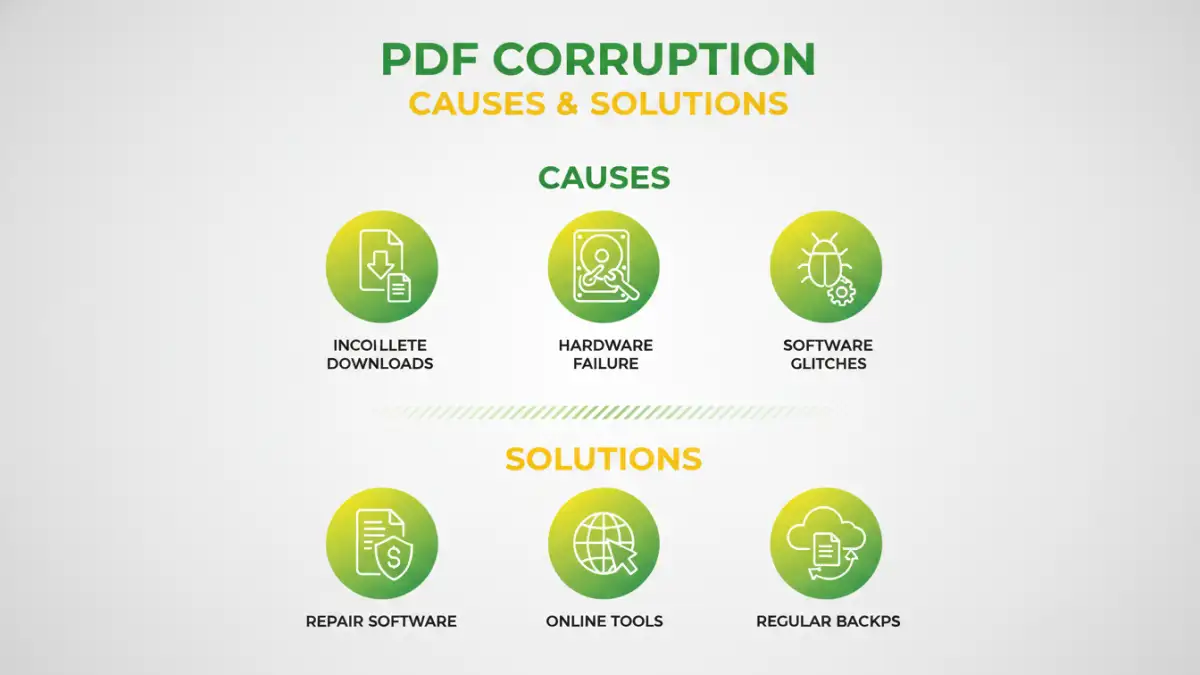
PDF corruption can stem from various sources. It might be due to an incomplete download, a sudden power outage during file saving, errors during file transfer, or even issues with the PDF reader software itself. Sometimes, malware can also be the culprit, specifically targeting and damaging files.
Common Causes
Identifying the cause isn't always straightforward, but common culprits include interrupted downloads, faulty storage media, software glitches, or improper file handling. Recognizing these potential issues can help in preventing future problems and understanding why a specific file might be damaged.
Basic Troubleshooting Steps

Before diving into complex solutions, it's wise to try a few simple checks. First, ensure you're using an up-to-date PDF reader, like Adobe Acrobat Reader. Sometimes, an older version can have compatibility issues. Try opening the file on a different device or with a different PDF viewer; this can help determine if the issue is with the file itself or your software setup.
Another quick fix is to re-download the file if it was obtained online. If you received it via email, ask the sender to resend it. This ensures that the file you have isn't damaged due to transmission errors. Sometimes, a simple retry is all that's needed.
Using Online PDF Repair Tools
For many common corruption issues, online PDF repair tools can be surprisingly effective. These web-based services allow you to upload your damaged PDF file, and their algorithms attempt to repair it. They are convenient because they don't require any software installation and can often be used quickly from any internet-connected device.
While these tools are easy to use, it's crucial to be mindful of privacy. Uploading sensitive documents to third-party websites carries inherent risks. Always opt for reputable services and review their privacy policies. Tools like Smallpdf, iLovePDF, or PDF2Go offer repair functionalities, often with a free tier for basic use.
Leveraging Desktop Software
When online tools fall short, or if you're dealing with highly sensitive documents and prefer not to upload them, dedicated desktop software for PDF repair is a powerful alternative. These applications are installed on your computer and can often handle more severe cases of corruption.
Software like Stellar Repair for PDF or Kernel for PDF Repair offers advanced scanning and repair capabilities. They work by analyzing the PDF structure and rebuilding it based on available data. While most professional-grade software comes with a cost, they often provide a trial version, allowing you to test their effectiveness before purchasing. This can be a worthwhile investment if you frequently encounter corrupted pdf file recovery challenges.
Advanced Recovery Methods
In some situations, more advanced techniques might be necessary. If the PDF was created from scanned images, you might be able to use Optical Character Recognition (OCR) software to extract the text, even if the original PDF structure is severely damaged. This isn't a direct file repair but can help salvage the textual content.
Another approach involves examining file fragments. If the PDF file was saved incrementally, parts of the document might still be intact. Specialized data recovery tools, or even manual hex editor analysis (for the technically inclined), could potentially reconstruct portions of the file. This is a more complex process and is usually a last resort.
Preventing Future Corruption
The best way to deal with corrupted files is to avoid them altogether. Always ensure your PDF reader software is up-to-date. When saving or transferring large PDF files, use stable internet connections and avoid interrupting the process. Regularly backing up your important documents is also a critical step in data protection.
Consider using PDF compression tools judiciously, as excessive compression can sometimes lead to file integrity issues. When creating PDFs, ensure the source document is saved correctly before conversion. Implementing these practices can significantly reduce the chances of encountering a corrupted pdf file.
Comparison of PDF Repair Approaches
| Method | Pros | Cons | Best For |
|---|---|---|---|
| Updated PDF Reader | Free, Quick check | Only fixes reader-specific issues | Minor glitches |
| Re-download/Resend | Free, Simple | Only works for transmission errors | Incomplete downloads |
| Online Repair Tools | Convenient, No installation | Privacy concerns, limited features | Common corruption, quick fixes |
| Desktop Software | Powerful, handles severe corruption | Paid, requires installation | Complex issues, sensitive data |
| OCR Software | Recovers text from scanned PDFs | Doesn't repair original formatting | Salvaging text content |