Working with sensitive digital documents often brings up questions about ownership and usage rights. When you encounter a PDF that seems protected, it's natural to wonder about the underlying copyright implications. Understanding these aspects is crucial for both creators and users of digital content, ensuring that intellectual property is respected and legally handled.
Table of Contents
Core Concepts of PDF Copyright
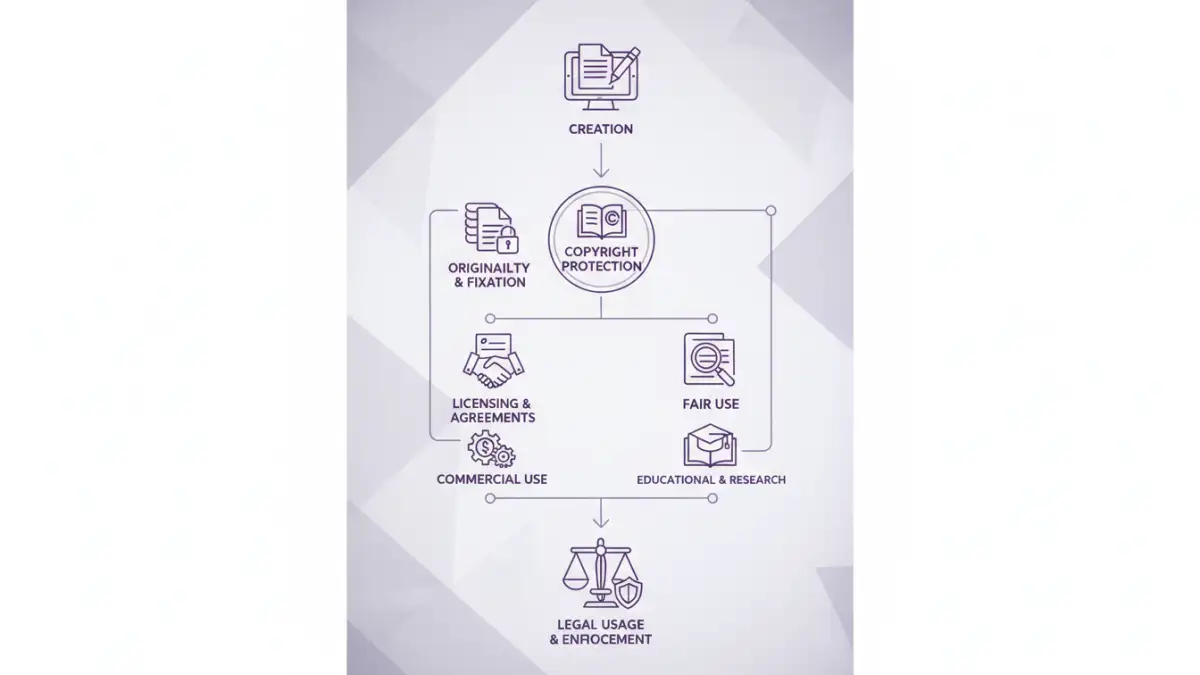
At its heart, copyright protects original works of authorship, including literary, dramatic, musical, and certain other intellectual works. This protection extends to digital formats like PDFs. When you create a document and save it as a PDF, you automatically hold the copyright to that content, provided it meets the criteria for originality.
A copyright protected pdf is essentially a PDF file whose content is legally safeguarded against unauthorized reproduction, distribution, or modification. This doesn't necessarily mean the PDF is technically locked with a password; it refers to the legal rights vested in the creator of the document's content.
What Constitutes Originality?
For copyright to apply, a work must be original and possess a minimal degree of creativity. This means it must originate from the author and not be copied from somewhere else. Simple factual compilations or data might not always qualify, but the arrangement and expression of that data typically do.
Legal Framework for Digital Documents

Document copyright law in the digital age is shaped by international treaties and national legislation. Laws like the Digital Millennium Copyright Act (DMCA) in the US provide frameworks for addressing copyright infringement in the online environment. These laws aim to balance the rights of copyright holders with public access and innovation.
When dealing with PDF intellectual property, understanding the terms of use or licensing agreements associated with the document is paramount. These agreements can grant specific permissions for use, even if the underlying copyright remains with the creator. Ignoring these terms can lead to legal issues.
Methods for Protecting Your PDFs
Creators have several technical and legal avenues to protect their PDF content. Password protection is a common method, restricting access or editing capabilities. Beyond passwords, digital rights management (DRM) solutions offer more granular control over how a PDF can be used, such as limiting printing or copying.
Watermarking is another effective technique. A visible or invisible watermark can be embedded in the PDF to indicate ownership or deter unauthorized use. While not a technical barrier, it serves as a strong deterrent and can be evidence in case of infringement.
Password Protection Levels
PDFs can often be protected with two types of passwords: an 'owner' password, which restricts actions like printing or copying, and a 'user' password, which is required to open and view the document. Understanding which protection is applied is key to knowing how to legally interact with the file.
Navigating Legal PDF Usage
For users, the key to legal PDF usage lies in respecting the copyright holder's rights. This means adhering to any stated terms of use, license agreements, or copyright notices. If a document is marked as 'all rights reserved,' you generally cannot share, modify, or republish it without explicit permission.
Fair use or fair dealing provisions in copyright law may permit limited use of copyrighted material for purposes such as criticism, commentary, news reporting, teaching, scholarship, or research. However, these are complex legal doctrines and should be applied cautiously. Consulting with a legal professional is advisable if you are unsure about the legality of your intended use.
Best Practices for PDF Handling
When you create PDFs, implement appropriate protection measures from the outset. Clearly state copyright information within the document itself. Use strong passwords if restricting access and consider watermarking for added security and attribution.
As a user, always check for copyright notices or license terms before downloading or sharing a PDF. If you need to use copyrighted material beyond what is permitted, seek explicit permission from the copyright holder. This approach helps maintain ethical standards and avoids potential legal entanglements.
Comparison Table: PDF Protection Methods
| Method | Description | Pros | Cons | Best For |
|---|---|---|---|---|
| Password Protection (Open) | Requires password to view/open the document. | Prevents unauthorized viewing. | Can be bypassed with password recovery tools if password is weak or forgotten. | Securing sensitive documents from casual viewing. |
| Password Protection (Permissions) | Restricts actions like printing, copying, or editing. | Controls how the document can be used after opening. | Does not prevent viewing; can be circumvented if the document is printed and scanned. | Preventing unauthorized distribution or modification of content. |
| Digital Rights Management (DRM) | Advanced system controlling access and usage based on license. | Offers granular control, tracks usage, can revoke access. | Can be complex to implement, may require specific software for users. | Commercial distribution, academic publishing, protecting high-value content. |
| Watermarking | Overlaying text or images (visible/invisible) on the document. | Deters unauthorized use, indicates ownership, aids in tracking. | Not a technical barrier; can be removed or obscured. | Branding, proving authorship, discouraging unauthorized sharing. |