
When dealing with important contracts, legal agreements, or sensitive reports, ensuring their authenticity and preventing tampering is paramount. I've seen firsthand how a compromised document can lead to significant issues, from legal disputes to financial losses. This is where the power of digital signatures truly shines, offering a robust solution to verify the origin and integrity of structured documents.
A digital signature is more than just a digital scribble; it's a cryptographic mechanism that provides strong assurance about the sender and the content of a document. It leverages public-key cryptography to create a unique digital fingerprint for a document, making it incredibly difficult to forge or alter without detection.
Table of Contents
- Understanding the Basics
- How Digital Signatures Work
- Benefits of Digital Signatures
- Implementation and Usage
- Legal and Regulatory Considerations
- Best Practices for Secure Signing
Key Concepts
Choosing a Method
Workflow Integration
Understanding the Basics
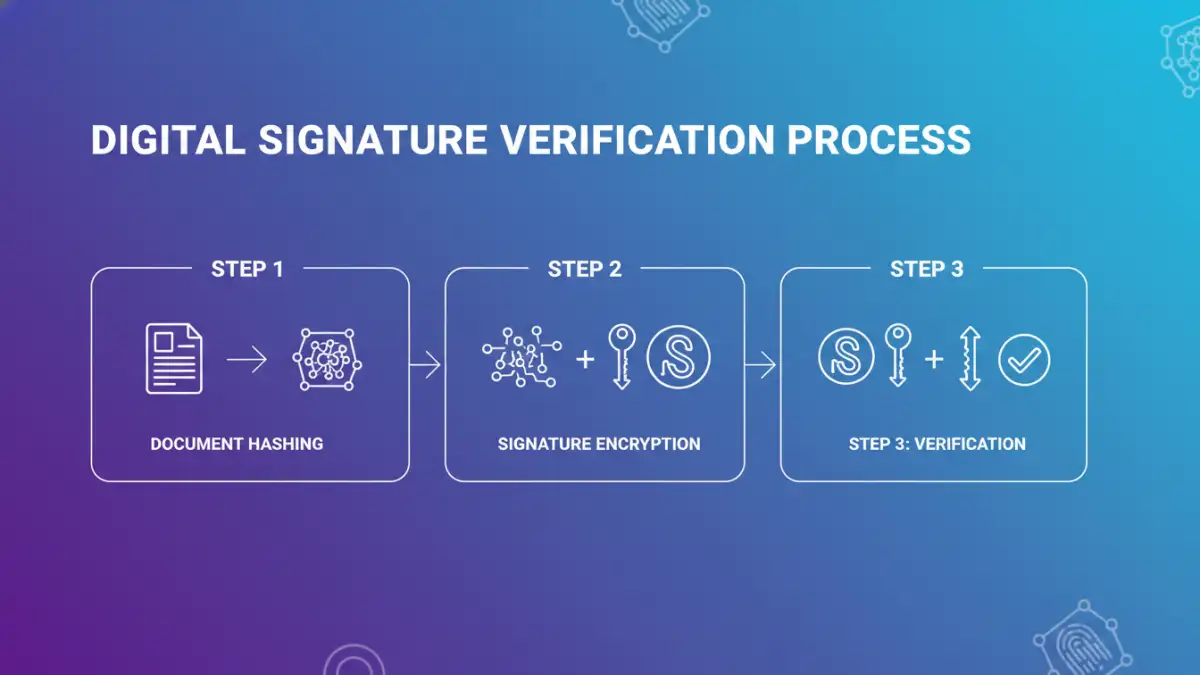
At its core, a digital signature is a type of electronic signature that uses encryption to verify authenticity. Unlike a simple scanned signature image, a digital signature is mathematically bound to the document it's attached to. This binding ensures that any modification to the document after signing invalidates the signature.
This process is crucial for structured documents, such as PDFs, Word files, or even data files. These formats often contain critical information that needs to be protected from unauthorized changes. The ability to verify document integrity is a cornerstone of digital trust.
Key Concepts
The technology behind digital signatures relies on asymmetric cryptography, also known as public-key cryptography. This involves a pair of keys: a private key, kept secret by the signer, and a public key, which can be shared widely. The private key is used to create the signature, and the corresponding public key is used to verify it.
A hash function is also integral. It creates a unique, fixed-size digest (or fingerprint) of the document's content. If even a single character in the document changes, the hash will be completely different. This hash is then encrypted with the signer's private key to form the digital signature.
How Digital Signatures Work

When you apply a digital signature to a document, the process involves several steps. First, a cryptographic hash of the document is generated. This hash is a condensed representation of the entire document's content.
Next, this hash is encrypted using the signer's private key. The resulting encrypted hash is the digital signature, which is then attached to the document. This signature contains information about the signer, the signing date, and the document's hash.
To verify the signature, the recipient's software performs a similar process. It generates a new hash of the received document and decrypts the attached digital signature using the signer's public key. If the decrypted hash matches the newly generated hash, the signature is valid, confirming both the file authenticity and that the document hasn't been altered since it was signed.
Benefits of Digital Signatures
The primary benefit is enhanced security and trust. Digital signatures provide non-repudiation, meaning the signer cannot later deny having signed the document. This is invaluable for legal and business transactions.
Efficiency is another major advantage. Digital signatures streamline processes, eliminating the need for printing, signing, scanning, and mailing physical documents. This speeds up workflows and reduces operational costs. The secure digital signing process is also auditable.
Implementation and Usage
Implementing digital signatures can range from simple browser-based tools for personal use to complex enterprise solutions for large organizations. The choice often depends on the volume of documents, the level of security required, and legal compliance needs.
Many software applications, including PDF readers and word processors, have built-in support for digital signatures. These tools often integrate with certificate authorities (CAs) that issue and manage digital certificates, which contain the public key and identity information of the signer.
Choosing a Method
For individual users or small businesses, using integrated features in common software like Adobe Acrobat or Microsoft Word is often sufficient. These tools guide you through the process of obtaining or using a digital certificate and applying signatures.
Larger organizations might opt for dedicated digital signature platforms or integrate with identity management systems. These solutions offer more advanced features like batch signing, workflow automation, and enhanced audit trails, ensuring robust file authenticity.
Workflow Integration
Integrating digital signatures into existing workflows is key to maximizing their benefits. This means ensuring that the signing process is seamless for both the sender and the recipient. Training users on how to apply and verify signatures is also important.
Consider how signatures fit into your document lifecycle. From creation and review to approval and archiving, ensuring that each stage is secured with appropriate digital signing methods will bolster overall document trust.
Legal and Regulatory Considerations
The legal standing of digital signatures varies by jurisdiction, but many countries have enacted laws that recognize their validity. For instance, eIDAS regulation in the European Union provides a framework for electronic signatures, including digital signatures.
It's crucial to understand the specific legal requirements in your region or industry. Using qualified digital certificates and adhering to specific signing procedures can further strengthen the legal enforceability of your digitally signed documents.
Best Practices for Secure Signing
Protect your private key diligently. It's the key to your digital identity; if it's compromised, your signatures can be misused. Use strong passwords or hardware security modules (HSMs) for added protection.
Always verify the identity of the signer and the integrity of the document before trusting a digital signature. Ensure your software is up-to-date to correctly validate signatures and recognize trusted certificate authorities. This helps maintain file authenticity.
Use digital signatures consistently for all important documents where authenticity and integrity are critical. This creates a reliable audit trail and reinforces document trust across your organization.
Comparison Table
| Method | Description | Security Level | Ease of Use | Cost |
|---|---|---|---|---|
| Basic PDF Signing (e.g., Adobe Reader) | Allows adding a simple signature image or text, sometimes with basic digital certificate validation. | Low to Medium (depends on certificate) | High | Free for basic use |
| Advanced PDF Signing (e.g., Adobe Acrobat Pro) | Full support for digital certificates, timestamps, and validation of document integrity. | High | Medium | Paid subscription |
| Dedicated Digital Signature Platforms (e.g., DocuSign, HelloSign) | Cloud-based services offering robust workflows, audit trails, and compliance features. | High | High | Subscription-based (tiered) |
| Code Signing Certificates | Used to digitally sign software code to verify publisher identity and code integrity. | Very High | Medium (requires developer tools) | Paid certificate |