
Have you ever felt lost in a sea of acronyms like AES, TLS, or PGP when trying to secure a document? It's a common feeling. The world of digital security is filled with specialized language that can feel impenetrable, but understanding it is the first step toward effectively protecting your information.
This glossary is designed to be a straightforward reference. I've broken down the essential encryption and document security terms I encounter daily into simple, understandable definitions. Think of it as a quick translator for the language of data protection.
Table of Contents
A-E: Foundational Concepts
This section covers the absolute basics—the building blocks upon which all digital security is built. From the most common encryption standard to the core principles of verifying identity, these are the terms you'll see most often.
Advanced Encryption Standard (AES)
AES is the gold standard for symmetric encryption, used by governments and businesses worldwide. When you encrypt a file with a password in most modern applications, you're likely using AES. It comes in different key lengths (128, 192, and 256-bit), with AES-256 being the strongest and my team's go-to for securing sensitive application data.
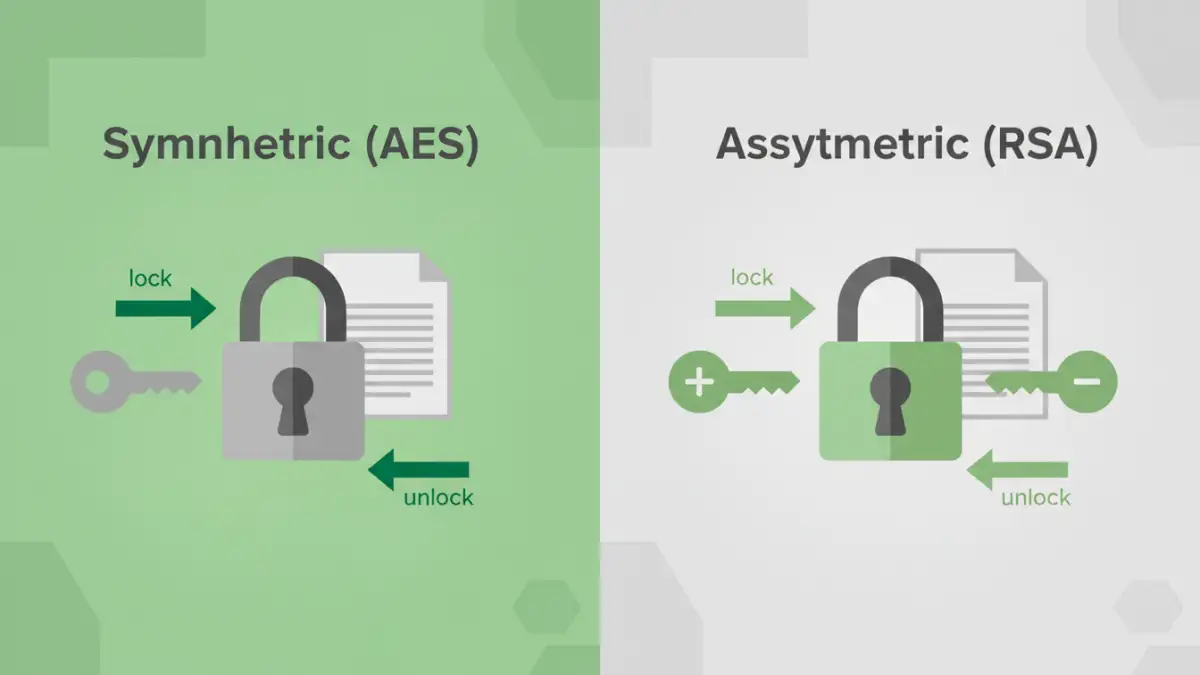
Asymmetric Encryption: Also known as public-key cryptography, this method uses a pair of keys: a public key to encrypt data and a private key to decrypt it. The public key can be shared freely, but the private key must be kept secret. This is the technology behind things like secure email (PGP) and secure web connections (SSL/TLS).
Authentication: The process of verifying that someone (or something) is who they claim to be. This can be as simple as a password or as complex as a multi-factor system involving a fingerprint and a one-time code.
Ciphertext: This is what you get after you encrypt data. It's the scrambled, unreadable version of your original information (the plaintext). The goal is that even if someone intercepts the ciphertext, it's useless without the key to decrypt it.
F-L: Integrity and Keys

Once you've encrypted something, how do you know it hasn't been tampered with? And how do you manage the keys that lock and unlock your data? This group of terms deals with data integrity and the management of cryptographic keys.
Hashing vs. Encryption
While often confused, hashing and encryption serve different purposes. Encryption is a two-way process; you encrypt data to hide it and can later decrypt it with a key. Hashing is a one-way process. It converts data into a fixed-length string of characters (a hash) that cannot be reversed. We use hashing extensively in software development to store passwords securely. We don't need to know the password, only that the hash of the password a user enters matches the one we have stored.
Digital Signature: A cryptographic method used to verify the authenticity and integrity of a message or document. It's like a digital fingerprint that confirms the document came from the claimed sender and hasn't been altered.
Encryption Key: A piece of information (a string of bits) that an algorithm uses to transform plaintext into ciphertext and back again. The security of your encrypted data is entirely dependent on the security of this key.
Key Length: Measured in bits, this determines the number of possible combinations for a key. A longer key means more combinations, making it exponentially harder to crack through brute-force attacks. This is why AES-256 is much more secure than the older, now-obsolete DES standard.
M-R: Permissions and Protocols
This section covers the tools, protocols, and threats that exist in the broader digital ecosystem. Understanding these helps you see how document security fits into the bigger picture of cybersecurity.
Multi-Factor Authentication (MFA): A security process that requires users to provide two or more verification factors to gain access to a resource. This adds a critical layer of protection beyond just a password. I always enable MFA on any service that offers it.
PGP (Pretty Good Privacy): An encryption program that provides cryptographic privacy and authentication for data communication. It's often used for signing, encrypting, and decrypting texts, emails, files, and directories to increase the security of email communications.
Plaintext: The original, readable data before it is encrypted into ciphertext. This is the sensitive information you are trying to protect.
RSA: An asymmetric encryption algorithm and one of the first. It's widely used for secure data transmission, particularly in the SSL/TLS protocols that secure websites. While still secure, it's often used alongside symmetric algorithms like AES for efficiency.
S-Z: Secure Connections and Modern Methods
Finally, we look at the technologies that secure data in transit and some of the more advanced concepts shaping the future of privacy and security.
SSL/TLS (Secure Sockets Layer/Transport Layer Security): These are the protocols that provide secure communication over a computer network. When you see `https://` in your browser's address bar, that's TLS in action, encrypting the data between your browser and the server. It's a fundamental piece of web security.
Symmetric Encryption: An encryption method that uses the same key for both encryption and decryption. It's much faster than asymmetric encryption, which is why it's often used for encrypting large amounts of data, like an entire hard drive or a large document. AES is the most popular example.
VPN (Virtual Private Network): A service that creates a secure, encrypted connection over a less secure network, such as the public internet. It masks your IP address and encrypts your traffic, enhancing your privacy and security online.
Zero-Knowledge Proof: An advanced cryptographic method where one party can prove to another that they know a value, without conveying any information apart from the fact that they know the value. It's a fascinating area with growing applications in privacy-focused systems.
Encryption Standards at a Glance
Navigating the various data protection terms can be easier when you see them side-by-side. Here’s a quick comparison of some of the most common cryptographic standards.
| Standard | Type | Primary Use | Key Feature |
|---|---|---|---|
| AES | Symmetric Encryption | Encrypting files, databases, and full disks | Fast, efficient, and considered the industry standard for bulk data encryption. |
| RSA | Asymmetric Encryption | Secure data transmission (SSL/TLS), digital signatures | Uses a public/private key pair, ideal for secure key exchange. |
| SHA-256 | Cryptographic Hash | Password storage, data integrity verification | One-way function; produces a unique, fixed-size hash. It cannot be reversed. |
| PGP | Hybrid System | Secure email and file communication | Combines the speed of symmetric encryption with the security of asymmetric encryption. |
| TLS | Protocol | Securing internet connections (HTTPS) | Provides authentication, encryption, and data integrity for network traffic. |