
Working with sensitive information online often means dealing with large, encrypted documents. Whether it's proprietary business data, personal financial records, or confidential research, ensuring these files remain protected during transit and storage is paramount. My experience has shown me that a layered approach, combining technical safeguards with user awareness, is key to maintaining robust security.
The challenge intensifies with larger file sizes. Uploading, downloading, and processing these documents can strain bandwidth and increase the window for potential interception. It’s not just about encrypting the data itself, but also managing the entire lifecycle of the document securely.
Table of Contents
Understanding the Basics
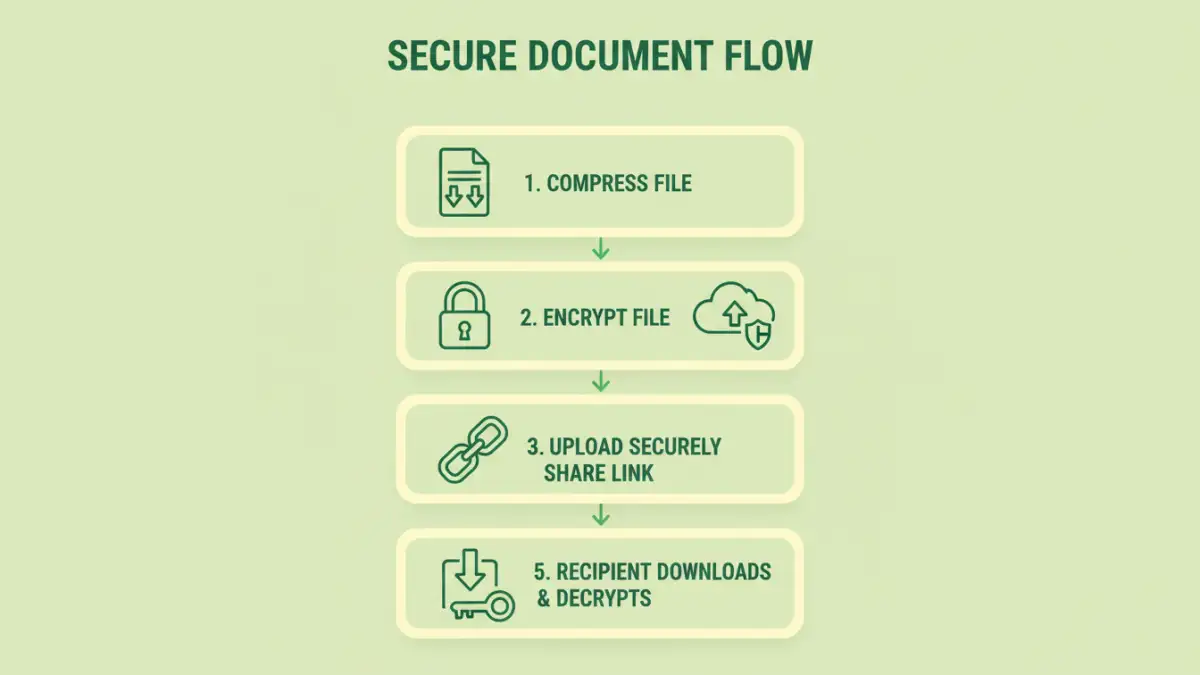
At its core, secure document handling involves protecting data from unauthorized access, modification, or disclosure. This is achieved through various encryption methods, secure transfer protocols, and access controls. For large documents, the volume of data amplifies the importance of each step.
Encryption scrambles data into an unreadable format, requiring a specific key or password to decrypt. When we talk about handling secure encrypted documents online, we're referring to the entire process: from creating the encrypted file to sharing it and ensuring it reaches its intended recipient securely.
Key Concepts in Document Security
Key concepts include end-to-end encryption, where data is encrypted at the source and decrypted only at the destination, ensuring intermediaries cannot access it. Strong passwords or robust key management are also critical. For large files, compression before encryption can sometimes help, though it doesn't inherently add security.
Practical Methods for Online Security

When dealing with large encrypted documents online, several practical methods can be employed. These range from using built-in features in common software to specialized online tools and services.
Secure File Transfer Protocols
Using protocols like SFTP (Secure File Transfer Protocol) or FTPS (FTP Secure) is fundamental for transferring large files. These protocols encrypt the data during transmission, preventing eavesdropping. Many cloud storage services also offer secure upload/download links that utilize encryption.
Online Encryption Tools
There are numerous online tools that allow you to upload a document, encrypt it with a password, and then download the secured file. While convenient for smaller tasks, for very large documents, you must be mindful of the provider's privacy policy and security practices. Ensure they use strong encryption algorithms like AES-256.
Cloud Storage Security Features
Major cloud storage providers (like Google Drive, Dropbox, OneDrive) offer varying levels of security. Enabling two-factor authentication (2FA) on your account adds a significant layer of protection. Some services also offer client-side encryption, where files are encrypted on your device before being uploaded, though this is less common for standard document types.
Advanced Security Measures
Beyond basic encryption and secure transfers, advanced techniques can further bolster the protection of large documents.
Access Control and Permissions
Implementing granular access controls is vital. This means ensuring that only authorized individuals can access the documents and defining what actions they can perform (view, edit, download). Many enterprise-level cloud solutions offer robust permission management.
Digital Signatures
For ensuring document integrity and authenticity, digital signatures are invaluable. They use cryptographic principles to verify that a document has not been tampered with since it was signed and confirm the identity of the signer. This is especially important for legal or contractual documents.
Volume Encryption for Multiple Files
If you have a collection of large documents to secure, consider using software that can encrypt entire folders or archives (like .zip or .7z files with password protection). This streamlines the process and ensures consistent security across all files.
Essential Best Practices
Regardless of the methods or tools used, certain practices are non-negotiable for maintaining data protection. I’ve seen too many breaches happen due to simple oversights.
Always use strong, unique passwords for encryption and for your online accounts. Avoid easily guessable combinations or reusing passwords. Regularly update your security software and operating system to patch vulnerabilities. Be cautious of phishing attempts that might try to trick you into revealing encryption keys or passwords.
Comparison Table: Online Document Security Methods
| Method | Pros | Cons | Best For |
|---|---|---|---|
| SFTP/FTPS Transfer | Strong encryption during transit, reliable for large files | Requires specific client software, can be slower than HTTP for small files | Securely transferring very large files between servers or to specific users |
| Online Encryption Tools (e.g., encrypt.io, etc.) | Convenient, no software installation, often free for basic use | Privacy concerns with third-party handling, potential file size limits, relies on provider's security | Quick, one-off encryption of moderately sized documents when privacy concerns are minimal |
| Cloud Storage (with 2FA) | Integrated workflow, accessibility, version history | Relies on provider's security infrastructure, potential for account compromise if 2FA is bypassed | Everyday document storage and sharing, collaboration |
| Desktop Encryption Software (e.g., VeraCrypt, 7-Zip) | Full control over encryption, strong algorithms (AES-256), handles any file size | Requires software installation, learning curve for advanced features, managing keys is user's responsibility | Securing entire drives, large archives of documents, or highly sensitive individual files |